Specialist magazine for entertainment electronics and new technology
  • Login
  • Register
Cart / 0,00 €

No products in the cart.

AVPlus
  • News
  • Tests & Comparisons
  • Presentations & Experiments
  • Articles & Guides
  • AVPlus Extra
  • Journal archive
No Result
View All Result
AVPlus
No Result
View All Result
in Comparison, TV & Home Theater, Video projectors, AVPlus Extra

Two great options for home theater: 4K UHD for 1,100 euros or FullHD for 600 euros?

Online deliverybyOnline delivery
24.12.2024
Two great options for home theater: 4K UHD for 1,100 euros or FullHD for 600 euros?
Reading Time: 21 mins read
A A

Text Teppo HirviKunnas Photos Teppo HirviKunnas

The prices of projectors with UHD or 4K resolution have dropped, and you can already get one from Epson for about a thousand euros. On the other hand, the lineup includes a decent full-HD model for almost half the price. Which one should you choose?

In the comparison:

  • Epson EH-TW-6250 UHD
  • CO-FH02 FHD

The resolution of UHD or 4K projectors is four times that of Full HD, and their prices have dropped by about a ton. On the other hand, high-quality (from well-known brands) Full HD projectors can be purchased for as little as under 600 euros. So the price difference is still quite significant.

The question is whether it is worth paying a double price for greater accuracy; after all, that is not necessarily the only factor influencing the quality of the image.

Two Epsons

We tested two relatively new Epson projectors, the models EH-TW6250 and CO-FH02.

The first of these represents Epson’s more modest model in the uhd range, and at the time of writing the price on Epson’s own website was 1,099 euros (prices vary slightly depending on the sales channel). The C0-FH02, on the other hand, is Epson’s so-called office-oriented fullhd projector, which, thanks to its features, is also perfectly suited for home theater use. And Epson even classifies it as such. The price of the C0-FH02 on Epson’s own website is 599 euros. However, on the Verkkokauppa.com website, the price was already 499 euros.

Both projectors use Epson's 3LCD display technology, which consists of three separate LCD panels. This 3LCD technology allows for at least in theory greater brightness across all the RGB color components.

4k with pixel pitch

The Epson EH-TW6250 is not exactly a true UHD projector, as the physical resolution of the panels is 1 920 x 1 080 pixels (i.e., full HD resolution). But the 3 840 x 2 160 pixel resolution is achieved using Epson’s 4K PRO-UHD technology, which creates a higher resolution by using a so-called pixel shift technology. In this technology, each pixel is moved to the side by 0.5 pixels twice as fast and with extremely high precision, resulting in a doubling of the number of pixels, or resolution, to 3 840 x 2 160 pixels. When this is done quickly, the eyes, or rather the brain, do not notice the movement and the difference between the image produced by the true 3 840 x 2 180 panel is virtually impossible to notice, even though opinions on this may differ.

Size and investment

The EH-TW6250 is not a mini projector, but in its class it is quite compact. The zoom lens, which allows for a wide throw ratio, also makes positioning it easier. For example, a 2.34–3.81 meter distance yields an image of 80 inches, and for a really large 120-inch image, 3.53–5.74 meters are required. There is a so-called keystone adjustment for the vertical/horizontal perspective distortion caused by indirect reflection, and there is also automatic correction in the vertical direction. With the so-called lens shift feature, the image can be shifted vertically without requiring the projector to be tilted. The adjustment of the image height enabled by the lens shift also expands the projection projector’s placement and mounting options. However, with Epson, the image can only be shifted downward from the base level, which means that in this case the bottom edge of the image is normally only slightly higher than the center of the lens (the so-called offset value is approximately 108 percent). From this point on, the image can be moved quite a lot. This is useful if the projector is placed high up, for example on a shelf on the back wall of the room. In this case, the image must be projected well down. More information about offset and other issues can be found in the link at the end of the article.
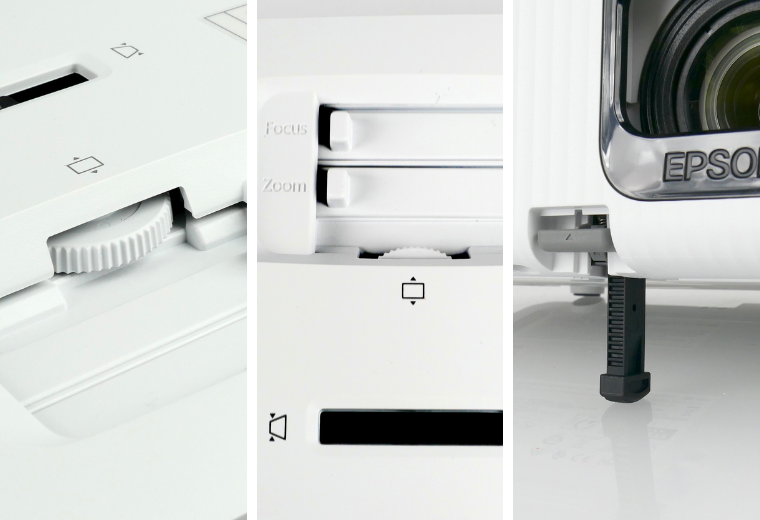
Two great options for home theater: 1,100 euro 4K UHD or 600 euro FullHD 2 1
The Epson EH-TW6250 has convenient image adjustments on the device itself. There are manual adjustments for image size (zoom), vertical position (lens shift), and lateral geometric error correction.
In CO-FH02, the adjustments are implemented digitally, and for example, the adjustment of the image size is much more limited and there is no corresponding adjustment for the vertical position of the image; instead, it must be done by tilting the projector, which again requires correcting for geometric errors.

The shape of the image can also be corrected digitally with the Quick Corner correction. It is worth noting that all digitally/electronically performed corrections require processing and have more or less an impact on the image’s accuracy and quality. Therefore, it would be best to get the image in its correct position with as few corrections as possible.

The more affordable fullhd model CO-FH02 is slightly smaller and lighter than the previous model. The lens produces a slightly smaller image of 80 inches at a shorter distance (2.11 meters) than the TW6250, but at the same time, the projector can’t be moved very far when aiming for a 80-inch image (2.86 meters). Conversely, for a 120-inch image, the distance between the lens and the screen is 3.18–4.30 meters. Therefore, there is zoom for the image, but the adjustment range is quite small and it is implemented digitally, whereas the TW6250 has an optical zoom.

The offset of the FH02 image is less than 100 percent (about 85 percent), which means that the bottom edge of the image is positioned somewhat lower than the center of the projector lens. This is important when positioning the projector. For example, if the bottom edge of a 100-inch screen is to be approximately 70 centimeters above the floor, the projector must be about 10 centimeters higher than that. If the projector is placed on a coffee table, for example, the projector must be tilted quite steeply upward. The image distortion can be corrected with the versatile adjustments of the CO-FH02. The position of the image can also be adjusted in both vertical and horizontal directions, but only digitally, and if the image is zoomed in first. This, however, reduces the image resolution. The simplest solution for a pop-up home theater would be to purchase a projector with its own height-adjustable floor stand or a 70–80 centimeter high stand.

In terms of size, the TW6250 is designed more clearly for fixed installation, while the FH02 can be set up for home theater more quickly and perhaps even more simply if needed. This is supported by its compact size, lightness, short throw distance, and versatile image settings, as well as good light output.
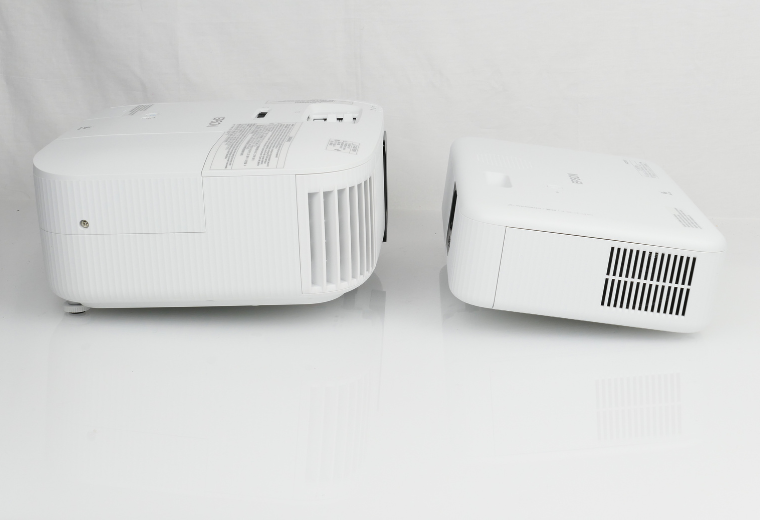
Two great options for home theater: 1,100 euro 4K UHD or 600 euro FullHD 1
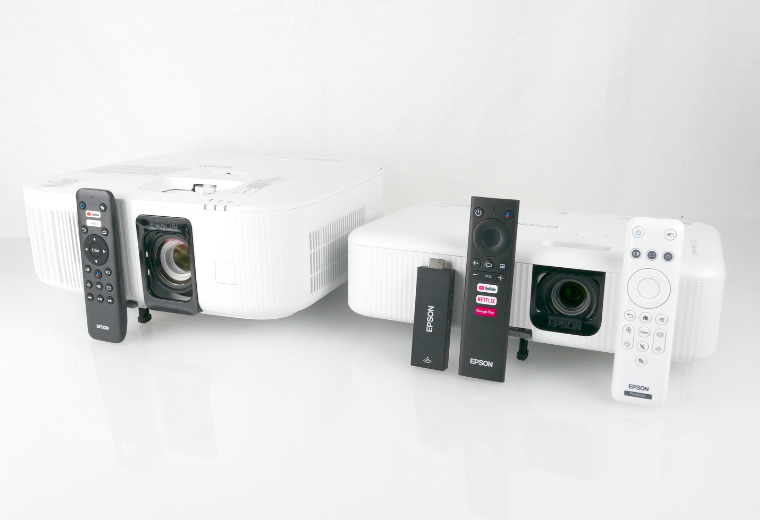
There is a significant difference in size between the devices. The larger 4k projector also weighs significantly more. Therefore, it is easier to casually set up a smaller full-HD projector than a 4k projector.

Connections and features

The TW6250 has two HDMI inputs, but the FH02 has only one. In principle, that’s enough for most people, and if you need to connect multiple video sources at once, separate HDMI switches/adapters don’t cost much.
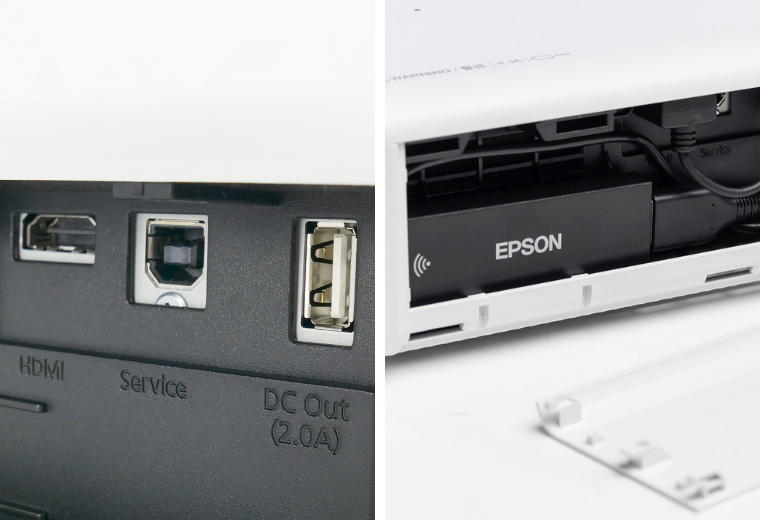
Two great options for home theater: 1,100 euro 4K UHD or 600 euro FullHD 2
The Epson CO-FH02 fullhd projector has only one HDMI input and USB power output. The device’s Android TV functionality is implemented using a separate dongle that must be attached to the projector and installed in the designated space. If you want to connect an additional device, such as a Bluray player, you must remove the dongle. The CO-FH02 does not have an audio output. This limits its use in a home theater setup, although you can still output audio wirelessly using the Bluetooth transmitter on the Android TV dongle. In that case, you must of course have a Bluetooth receiver or use Bluetooth speakers. The projector does have a speaker, but for movie watching it’s mostly just a joke. The same applies to the TW6250 model.

The need for connections is certainly reduced by the Android TV media player that can be wirelessly connected to the home network of both projectors. Epson’s own ELPAP12 (STI6110) media player brings the most popular streaming services (Youtube, Yle Areena, Netflix, and so on) as well as games and other applications to the devices. Movies and other content can therefore be played directly from the projector’s media player. The media player also includes the Chromecast feature, which allows the phone’s screen to be mirrored and displayed wirelessly on the projector.

The technical specifications of the media player are nothing special (Arm Cortex-A53, Mali-G31, 2 GB RAM and 8 GB memory), but they do the job well. On the other hand, the media player is capable of 3840 x 2160 resolution at 60fps with HDR support (HRD10). So it’s quite decent, and of course, there’s no reason not to replace the media player with another one. In our opinion, there’s no need for that.

In the TW6250, the media player is kind of built-in; in the FH02, it has an additional device that can be connected to a separate HDMI port. However, the built-in in the TW6250 is the same as the one in the FH02, but it is already placed under the door and connected to its own HDMI input and power supply. In the FH02, you have to connect this device yourself, but it also has its own place behind the side panel. A bit of a strange solution, but it works well. In the FH02, however, this device also takes up the device’s only HDMI input. In the TW6250, the device has its own separate HDMI input and the other one is left free.
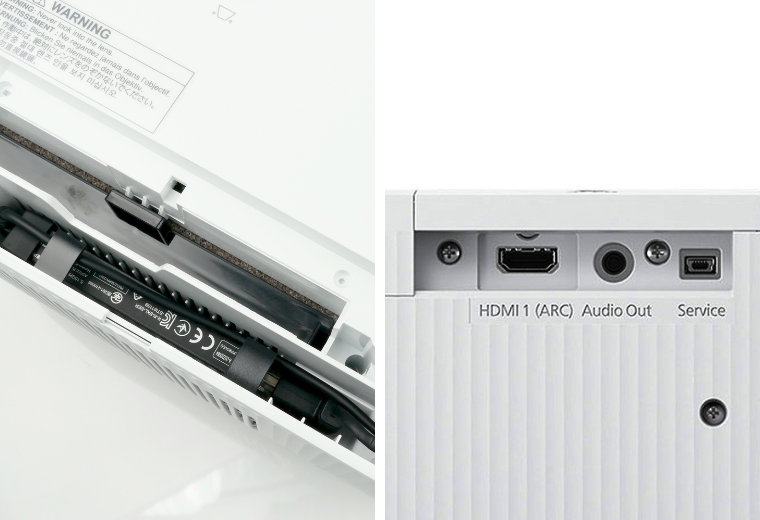
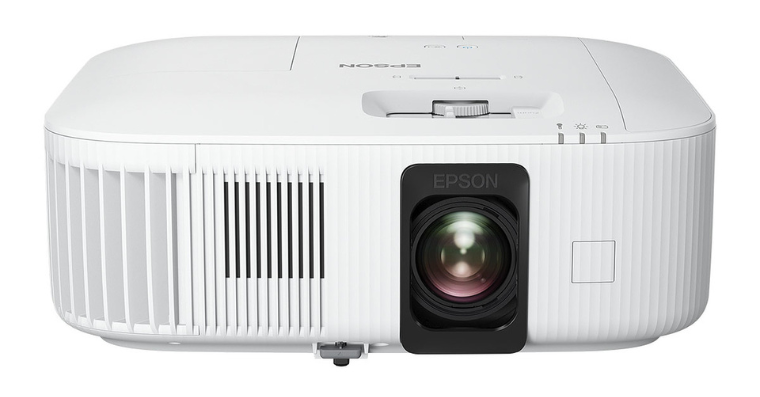
Two great options for home theater: 4K UHD for 1,100 euros or FullHD for 600 euros
The 4k projector Epson EH-TW6250 is said to have Android TV built-in. In practice, however, it is implemented with a separate dongle similar to the CO-FH02, but in this case it is pre-installed. The TW6250 has its own separate HDMI input, leaving the other HDMI input free for other devices. In addition to the Bluetooth transmitter, the TW6250 also has a standard 3.5mm adjustable audio output.

Two great options for home theater: 4K UHD for 1,100 euros or FullHD for 600 euros 3
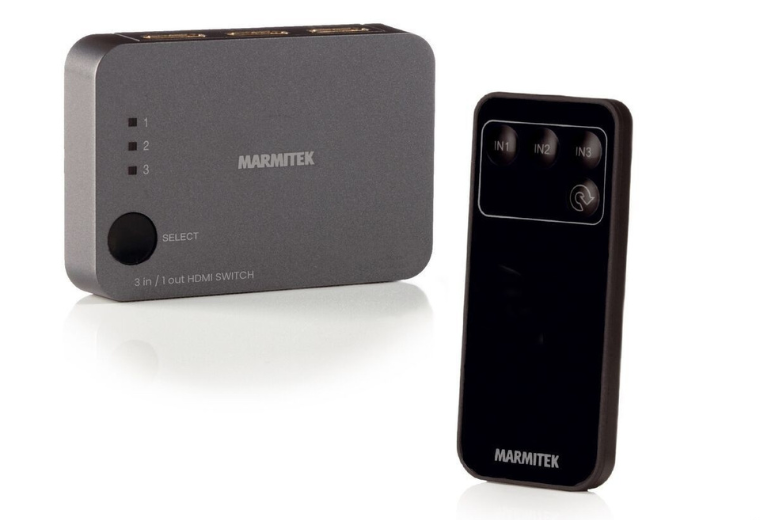
The number of projector connections is easy to increase with an HDMI switch/adapter. For example, in the photo, the Marmitek 8365 has three HDMI inputs and one output, as well as automatic (or manual from the device or remote control) source selection. The device does not require a separate power supply. Price about 45 euros.

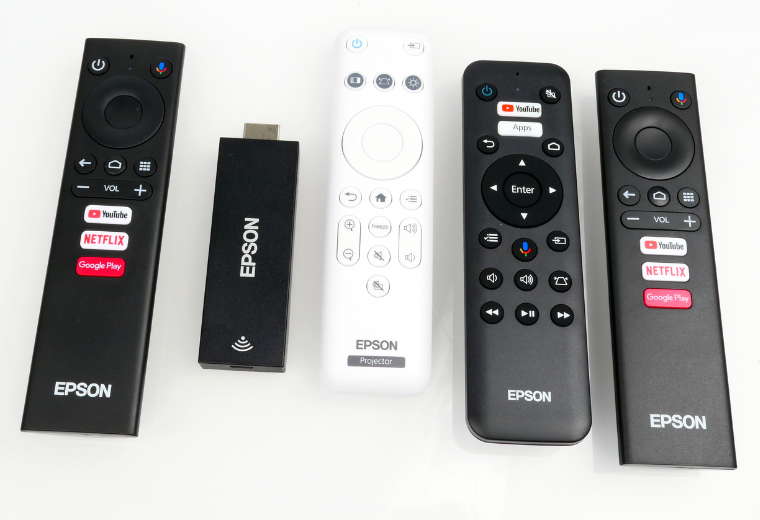
The devices come with two separate remotes, one for the media player and one for the projector’s functions. In the CO-FH02, the media player remote controller works with everything else except the projector settings. However, the only special feature is that you cannot start the projector with the media player remote controller but you can turn it off. A bit special. This is related to the fact that the media player remote controller works with a Bluetooth connection, so you don’t need to point it at the projector. In the TW6250, operation (including the media player) is done with the projector’s actual remote controller. At least that’s how the projector guides you. The connection to the media player via the remote controller is also reliable via Bluetooth, but with infrared for controlling the projector functions. A bit of a strange solution, but on the other hand, one remote controller is enough. However, the media player itself also comes with a remote control, which needs to be set up (bluetooth pairing) separately, but there is no real added value to this.
Two great options for home theater: 4K UHD for 1,100 euros or FullHD 3 for 600 euros
In the middle of the CO-FH2 is a clear white remote control and to its left is an Android TV remote with its own remote control. Convenient or not? The EH-TW6250 also comes with a separate remote control for the Android TV, but it only has functions for Android TV. Not all of them, though. A bit of a strange solution, but it does the job.

Sound

Sound plays a big role in movies. A proper multi-channel audio system should be used in home theaters, and we still recommend that. At the very least, though, you should have at least a pair of stereo speakers or even a soundbar speaker.

Both projectors do have built-in amplifiers and speakers, but for movie use they’re best left out. The sound is quite modest. If the projectors are intended for a fixed installation, it’s easy to implement sound with a decent set, but if it’s for occasional home theater sessions or you simply don’t have the budget for a mega system, the simplest way to reproduce the sound is with a slightly higher-quality portable Bluetooth speaker. This is made possible by the Bluetooth transmitter in the projector’s media player units. With them, the sound can be conveniently transmitted to the AV system, Bluetooth-enabled speakers, a soundbar speaker, or even wireless headphones.

The TW6250 also has a traditional 3.5mm audio output, and its HDMI output has an arc function, meaning the audio played back by the media player can be transferred all the way to the AV receiver via the HDMI cable. The FH02 has no other audio output besides the media player’s Bluetooth connection.

Implementation and image

Both projectors were easy to set up. After powering them on, the media player took over and guided me through the setup process on the network. As for Android, it’s advisable to have a Google account. Next, adjust the projector’s orientation, image size, and image distortion correction. Both projectors have good settings and even automatic functions for this. The settings on the TW6250 are perhaps a bit easier to use and better for image quality. On the FH02, the lens offset is also such that the bottom edge of the image is below the projector’s edge. The projector must be placed quite high, or in a sofa table setup, it must be tilted quite upward.

Both projectors have good settings for precise adjustment and even calibration, while the TW6250 is downright versatile. It is truly a wish for no adjustment whatsoever. However, the settings may not be available to those who are not familiar with the matter, and it is best to leave them alone. The image quality of both projectors was excellent straight from the package; it could be said to be excellent. In particular, the brightness of the image and colors was remarkable. The projector has three settings for the lamp power, of which “Standard” or even “Low” is suitable for a darkened room. On the FH02, there are two settings (High/Eco), of which “Eco” is sufficient for a darkened room. Low power reduces the need for electricity and also extends the lamp’s lifespan. In daylight mode, it is advisable to use the “High” setting. The lamp lasts for so long that even if you watched two and a half hours of movies every day for a year with full brightness, replacing the lamp would not become necessary until more than four years have passed.

When using high brightness, the cooling fan noise is audible in both projectors. Of course, it also depends on the location of the projector.

TW6250 supports HDR or high dynamic range technologies, and you can see that when playing compatible material.

Both projectors work excellently even in gaming mode. There was no noticeable input lag. Some sources mention a special gaming mode in the TW6250, but we did not find it. The projector’s input lag is reported to be under 20 milliseconds, and no lag was detected in the games.

Which one?

The setup and operation of both projectors are generally easy. With the TW6250, perhaps a little easier thanks to the optical zoom and the easy-to-use controls on the device itself. With the FH02, the controls are done through menus. With the FH02, you get a large image with slightly less throw distance than the TW6250. Also, its small size makes it easier to install. On the other hand, the projector requires an upward orientation, which in turn requires electronic correction of the image shape. The TW6250 is perhaps slightly better in this respect.

Both projectors produce a large image, but the TW6250, which offers a higher number of pixels, also produces a more detailed image with larger image areas, and the image can also be viewed closer up.

Both projectors produce high-quality images in their class, up to 120–150 inches if necessary. With the TW6250, I would even dare to say that its image is excellent in its class: sharp and bright in color. The image has very versatile settings if needed, but the image was of high quality right out of the package. The CO-FH02’s image is also bright, but it certainly loses out on its resolution in direct comparison with the TW6250. This depends somewhat on the material being viewed and the source of the image.

In terms of lighting, there may be a slight difference between the projectors, but on the other hand, the TW6250 offers, in our opinion, a more subjective contrast and image depth.

In their price range, both projectors are excellent choices. In some respects, they might even be better, but with these you can really enjoy the big picture.

If your budget allows, the Epson EH-TW6250 is our best choice when it comes to getting the best overall value for money, features and, above all, image quality.

The Epson CO-FH02 is a good choice when budget is limited and image quality is still a priority. The media player offers all the necessary image sources and streaming services. However, audio can only be output via Bluetooth.

Both projectors work well in gaming as well, but with the TW6250 only at 1080 resolution, not with 4K games.

Epson EH-TW6250

Price: 1099 €

Two great options for home theater: 4K UHD for 1,100 euros or FullHD 4 for 600 euros

Excellent entry-level UHD projector

The Epson EH-TW6250 is an excellent budget-priced UHD projector. Its image quality is excellent, even though it is not a true UHD resolution projector. The image is exceptionally bright and vibrant even in terms of colors, and it works directly out of the box, but the versatile settings offer even more control over the image in expert hands. The projector therefore works even in more serious but lower-budget home theater use when needed. We recommend that anyone considering a budget-friendly and easy-to-use UHD projector take a look at it.

Excellent picture in its class
Easy setup and operation
Android TV features
Bluetooth audio output
Comprehensive image adjustments

Noteworthy in its class

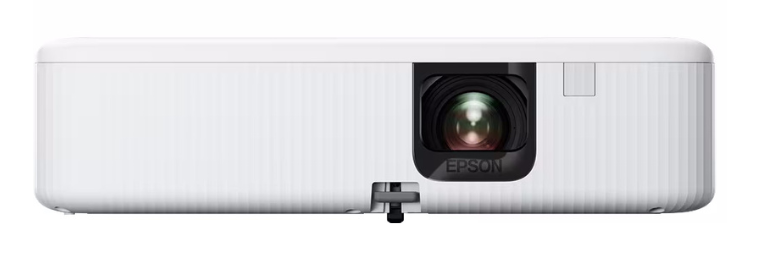
Epson CO-FH02

Price: 599 €
Two great options for home theater: 4K UHD for 1,100 euros or FullHD 5 for 600 euros

High-quality and affordable fullhd projector

The image quality of the Epson CO-FH02 is high-quality, bright, and vivid in its class. Its light output is enough for even larger images. What else can you ask for in an affordable price range? Well, of course, you can ask for anything, but image quality is the most important thing. The price includes an Android TV media player that also works separately, even with the TV. There are only one HDMI input, and that is normally used with the media player. So, not perfect, but the image quality in its class is excellent, and that’s right out of the box. An excellent and affordable full-HD projector for many uses: for gaming, mother-in-law trips, and even movies.

Live and clear image
Easy setup and operation
Android TV media player
Bluetooth audio output

Only one HDMI input (also reserved)
Fan noise (high setting)

More information about projectors

  • Information package about video projectors, their terms and selection.

Comparison projectors have plenty of features and functions

We didn’t bother listing them all in a table. The best way to get acquainted with the device’s settings and features is through the device’s (good!) user guides in Finnish (pdf files). They can often be a bit difficult to find on the manufacturer’s website, so we put them directly available for download.

  • Epson CO-FH02
  • Epson EH-TW6250

FULLHD – 4K – UHD?

- FHD (FullHD/Full High Definition), UHD (Ultra High Definition) and 4K are terms used to describe the resolution of the image/screen formed from pixels.

- The resolution of the FHD (or Full HD 16:9) image format is 1,920 pixels horizontally and 1,080 pixels vertically (indicated as 1,920 x 1,080 px or also 1080p).

- 4K was originally a standard agreed upon by film production companies for high-definition content used in film production. In 4K resolution, there are 4,096 x 2,160 pixels. Its name 4K comes from the number of horizontal pixels. There are also four times the number of pixels compared to FullHD image.

- The resolution of UHD, or Ultra High Definition, is 3,840 x 2,160, which is slightly less horizontally than true 4K, mainly due to the slightly different aspect ratio of the 4K movie standard (16:10) compared to the 16:9 format used by televisions and video projectors. In practice, however, UHD resolution equipment is referred to and marketed as 4K. In any case, the number of pixels is four times that of FHD resolution.

Brand & Model Epson CO-FH02 Epson TW6250
Price 599 € 1 099 €
Importer/Representative Epson Europe B.V. - Finnish Branch Office Epson Europe B.V. - Finnish Branch Office
More information Epson Epson
     
Project engineering 3LCD 3LCD 4K Pro UHD
Panel size 0.62 inches 0.61 inches
Wall lamp Only replaceable during servicing ELPLP97 (price approx. 100 €)
Native resolution 1920 x 1080 px 1920 x 1080 px (*)
Maximum resolution 1920 x 1080 px 3 840 x 2 160 px
Light source UHE 188 W UHE 200 W
Lamp lifetime > 6,000 t > 4 500 t
Maximum brightness 3,000 ANSI lumens 2,800 ANSI lumens
Light power settings High, Low High, Standard, Low
The greatest contrast 30,000:1 (dynamic) 35,000:1 (dynamic)
Zoom 1–1,35 (digital) 1–1,62 (manual)
Throw ratio 1,19–1,61:1 1,32–2,15:1
Throwing distance for a 80-inch image 2.11–2.86 m 2.34–3.81 m
Throwing distance for a 100-inch image 2.64–3.58 m 2.94–4.77 m
Throwing distance for a 120-inch image 3.18–4.30 m 3.53–5.74 m
Throwing distance for a 150-inch image 3.98–5.38 m 4.43–7.18 m
Maximum recommended image size 391 inches 500 inches
Lenticular transfer Digital (*) Capable ± 60 %
Keystone correction able to ± 30° (automatic/man.)
± 30° (man.)
able to ± 30° (automatic/man.)
± 30° (man.)
QuickCorner fix There is There is
Focusing Manual Manual
3D image No No
HDR support No HDR10, HLG
Photo studios Dynamic, Natural, Movie, Vivid Dynamic, Natural, Movie, Vivid
Cairn regulations There is There is
Game mode No There is
Image delay No air. < 20 ms
Connections    
HDMI (ARC) 1 (no) 2 (on) (*)
Audio output No 1 (3.5 mm, adjustable)
USB input On (only with power supply) On (only with power supply)
Wifi It is (**) There is (*)
Chromecast It is (**) There is (*)
Bluetooth transmitter On (5.0) (**) On (5.0) (*)
Built-in faucet There is There is
Application platform Android TV (ver.10) (**) Android TV (ver.10) (*)
Dimensions (l x w x h) 320 x 87 x 211 mm 333 x 131 x 275 mm
Weight 2.6 kg 4.1 kg
Power consumption (maximum/standby mode) 270 W / 0.5 W 301 W / 0.4 W
Sound level (maximum) 37 dBA 36 dBA
Other Warranty 24 months "Carry-in" Warranty 24 months "Carry-in" (lamp: 36 Months or 3,000 T)
Color options Black and white Black and white
Delivery content Remote control for projector, batteries, remote control for media player, power cord (1.8 m) Remote control for projector, batteries, remote control for media player, power cord (3.0 m), quick start guide (eng.)
  (*) Image transfer and only if the image is not zoomed to its maximum size and within the limits enabled by the zoom setting **) separate, device-mounted Epson ELPAP12 (STI6110) Android TV media player dongle (*) Second reserved for the Android TV media player, (**) separate Epson ELPAP12 (STI6110) Android TV media player dongle pre-installed on the device

This article was originally published in the issue of AVPlus magazine 2/2023 (#218).

35
SHARES
1.8k
VIEWS
Share on FacebookShare on WhatsApp
Previous Post

In the test Perlisten R4b – The precise interpreter of music

Next Post

In the experiment: Kampiradiot – Shifting sound, light and energy

Most read today

TCL A65K – affordable and just five cents deep 3.1.2 Dolby Atmos soundbar delivers an impressive sound

TCL A65K – affordable and just five cents deep 3.1.2 Dolby Atmos soundbar delivers an impressive sound

1.9.2026

TESTISSÄ KAIKU WAVE wireless noise cancelling headphones – a Finnish challenger in the tough premium category

The Consumer magazine tested 47 stem vacuum cleaners. The most expensive one was the best, but…

Big size for little money! In comparison, affordable 65-inch TVs – Surprisingly good picture for a reasonable price

Philips The Roller and The Tube – Moving sound with its own style

The new arrival of CDs is also reflected in devices – the Argon Audio CD1 is a new CD player priced at 399 euros

Latest

TESTISSÄ KAIKU WAVE wireless noise cancelling headphones – a Finnish challenger in the tough premium category

Philips The Roller and The Tube – Moving sound with its own style

QUESTION: How much are you willing to pay for a phone?

Quiz: Nokia phones

Cayin Jazz 70 – genuine tube sound and style at a reasonable price

The use of artificial intelligence in music is growing rapidly, but there is still a lot to be learned about its use – at least in Finland.

Subscribe to the newsletter

Subscribe to our newsletter and stay up to date with the latest news in technology and entertainment electronics.

Survey

How much are you willing to pay for your next phone?

Questionnaire archive

Quiz

Nokia phones
Take part in the quiz

Related Posts

IN THE TEST: TCL 65C7L – Bright Mini LED with Wide Color Reproduction
Test

IN THE TEST: TCL 65C7L – Bright Mini LED with Wide Color Reproduction

TCL has invested heavily in Mini LED TVs in recent years and has also brought high brightness, rich local contrast, and comprehensive gaming features to clearly...
21.9.2026
TCL Z100 and Z100-SW FlexConnect speakers – Easily almost like a real home theater
Test

TCL Z100 and Z100-SW FlexConnect speakers – Easily almost like a real home theater

Dolby Atmos FlexConnect promises to solve one of the eternal problems of multichannel sound: the speakers don't need to be exactly in the right positions. The TCL Z100 speakers can...

21.9.2026
IFA 2026 – these were the most interesting AV and technology innovations from Berlin
Report

IFA 2026 – these were the most interesting AV and technology innovations from Berlin

The Berlin IFA 2026 was not built around a single major announcement. TVs with RGB backlighting are making a strong entrance, soundbars are growing into full multi-channel systems, and projectors...
14.9.2026
Sonos updates its audio system with three new models – Beam Ultra, Ace Ultra and Sonos 27 expand the lineup
News

Sonos updates its audio system with three new models – Beam Ultra, Ace Ultra and Sonos 27 expand the lineup

Sonos has unveiled two new audio devices and a next-generation software platform in one go. The new products announced in early September include the compact Beam Ultra soundbar,...
9.9.2026
Monitor Audio revamped the Silver series after a five-year hiatus – seven 8G models for stereo and home theater
News

Monitor Audio revamped the Silver series after a five-year hiatus – seven 8G models for stereo and home theater

The long-lasting Silver speaker system from Monitor Audio has moved into the eighth generation. The new Silver Series 8G consists of seven models that can be used to build a traditional...

8.9.2026
TCL awarded six EISA awards – success for televisions and home theater sound
News

TCL awarded six EISA awards – success for televisions and home theater sound

TCL has been awarded in six categories in the EISA Awards 2026–2027 selection. The award list is heavily focused on televisions, but two home theater speakers are also included...

2.9.2026
Facebook Youtube

AVPlus

Inner Media Group Oy
Business ID: 2758167-7

Töölönkatu 44-48 C 45
00250, Helsinki
Finland

Delivery

Chief Editor
Teppo Hirvikunnas
Puh. +358 50 360 1450

Online delivery
verkkotoimitus@avplus.fi

General

Information about us
Company and contact information
Advertising and content collaboration

Order and contract terms
Privacy policy

© 2026 AVPlus / Inner Media Group Oy

Log In

Login to your account below

Forgotten Password? Sign Up

Sign Up

Fill the forms below to register

All fields are required. Log In

Retrieve your password

Please enter your username or email address to reset your password.

Log In
We've detected you might be speaking a different language. Do you want to change to:
Change language to Suomi Suomi
English
Change Language
Close and do not switch language
No Result
View All Result
  • Story type
    • News
    • Tests & Comparisons
      • Test
      • Comparison
    • Presentations & Experiments
      • Introduction
      • Experiment
    • Articles & Guides
      • Guide
      • DIY
      • Information
      • Report
      • Individuals
      • History
    • Editorial
    • Column
    • Record reviews
    • Information kiosks
    • Videos
  • Topic area
    • Audio & Hifi
    • High-End Audio
    • TV & Home Theater
    • Information technology
    • Mobile devices
    • Cameras & Photography
    • Music & Movies
    • Artificial intelligence
    • Smart Home & Automation
    • Fitness & Health
    • Games & Apps
      • Games
      • Applications
    • Other technology
  • Product group
    • Speakers
    • Active speakers
    • Subwoofers
    • Stereo amplifiers
    • AV amplifiers
    • Front amplifiers
    • Other amplifiers
    • DA converters
    • CD players
    • Web Players
    • Record players & sound recorders
    • Headphones
    • Headphone amplifiers
    • Radios
    • Other hi-fi equipment
    • TVs
    • Soundbars
    • Video projectors
    • Computers
    • Other IT products
    • Smartphones
    • Tablets
    • Smartwatches
    • Cameras
    • Streaming services
    • Game consoles
    • Other shovels
  • AVPlus Extra
  • Journal archive
  • Login
  • Sign Up
  • Cart

Is 1 credit used to open this article?

You have 0 credits available.
Are you sure want to cancel subscription?