
YD03 AI Translation Earbuds – lähes reaaliaikaista käännöstä 144 kielellä ja alle 7 eurolla

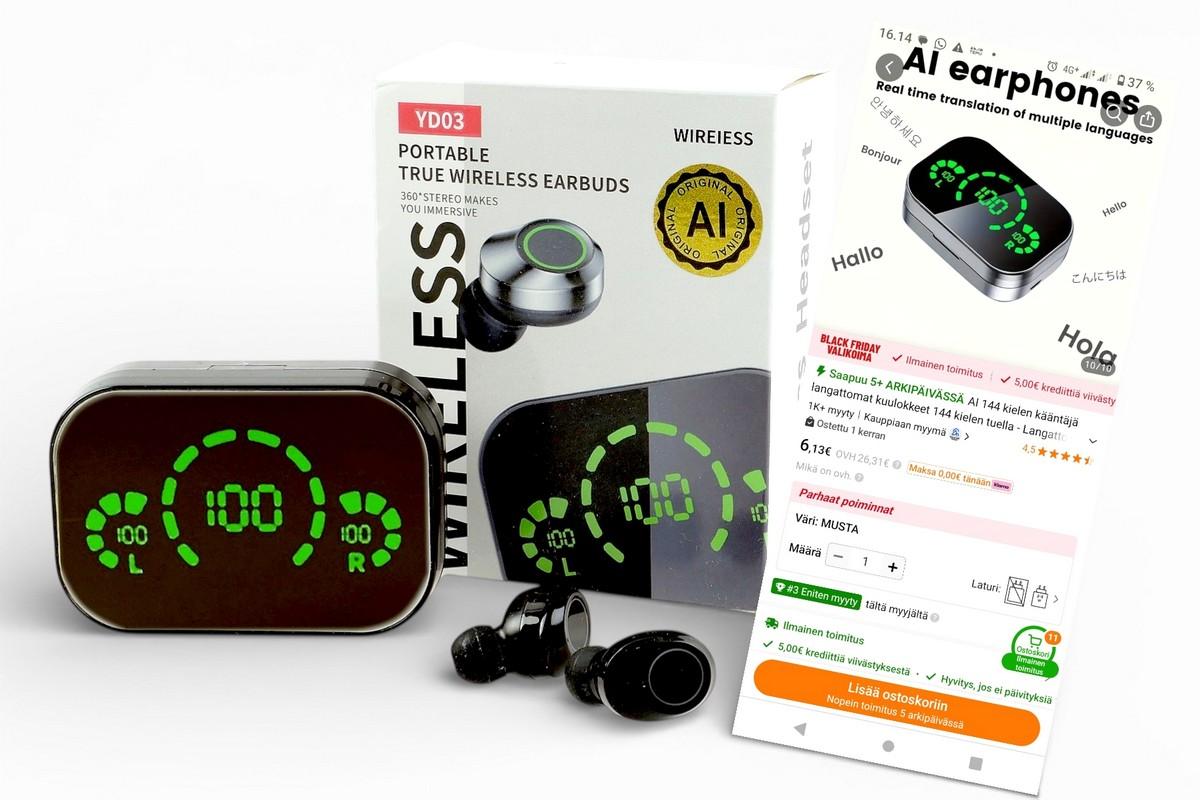
Reaaliaikainen (lähes) puheen käännös miltä kieleltä tahansa ja mille kielelle vaan ei ole enää tieteisfantasiaa – siihen yltävät jo seitsemän euron käännöskuulokkeet. Testasimme, miten Temusta hankitut YD03-kuulokkeet ja ilmainen TransKit-sovellus selviävät käytännön keskusteluista.
Lähes reaaliaikainen puheenkäännös kahden kielen välillä on ollut pitkään lähinnä tieteisfantasiaa, mutta tekoälyn kehitys on tuonut sen jo käytännön tasolle. Jo viime vuonna testasimme 130 euroa hintaisia käännöskuulokkeita, jotka kääntävät puheen suoraan toisella kielellä puhuttavaksi ääneksi. Ja ne toimivat jopa kohtalaisen hyvin.
Mielenkiinto aiheeseen heräsi uudelleen kun teimme raporttia vuoden 2025 IFA-messuista. Siellä esiteltiin “suurena uutuutena” kiinalaisia käännöskuulokkeita. No eihän nämä mitään uutuuksia ole, ja tästä kimmokkeena päätimme katsastaa mikä mahtaa olla tilanne markkinoilla. Ja mistäs muualta kuin Temusta tietenkin.
https://play.google.com/store/apps/details?id=com.google.android.apps.translate&hl=fi
Ja kas ollakaan, näitä AI-käännöskuulokkeita oli vaikka kuinka paljon. Ja mihin hintaan? Edullisimmillaan käännöskuulokkeita saa alle kympillä!! Tilasimme testiin vain reilu kuusi euroa maksavat YD03-kuulokkeet, joiden luvataan osaavan jopa 144 kieltä ja kääntävän puheen automaattisesti ja reaaliaikaisesti mille tahansa kielelle.
Laatu yllätti
Kuulokkeiden ja latauskotelon laatutuntuma ja rakenne ovat hinnan huomioiden oikeastaan käsittämättömän hyvät. Latauskotelon peilimäisessä kannessa on komea LED-näyttö, joka visualisoi niin latauskotelon kuin kuulokkeidenkin akkujen lataustilan näyttävästi. Latauskotelo on kuitenkin aika suuri eikä kulje taskussa kovin mukavasti.
Itse kuulokkeet ovat niin ikään laadukkaan oloiset, kompaktin kokoiset ja kevyet, ja istuvat useimmissa korvissa ilman ongelmia. Mukana on tosin vain yhdet korvasovitteet, joten pieni ja suurikorvaisille sopivuus saattaa tuottaa ongemia. Kuulokkeissa on kosketusohjaus ja se toimii hyvin. Kuunteluajaksi luvataan noin neljän tuntia ja latauskotelon akulla (800 mAh) kuulokkeet pitäisi pystyä lataamaan täyteen kahdeksan kertaa. Latauskoteloa voi käyttää sen USB-A-lähdön kautta myös pienenä virtapankkina. Ihan hyvältä siis vaikuttaa.
Myös käännös sujuu
Kuulokkeiden myyntivalttina oleva käännöstoiminto ei tapahdu kuulokkeissa vaan puhelimeen ladattavassa TransKit-sovelluksessa. (Kiinalaisessa tietenkin, ja tässä tulee toki heti mieleen, että koko idea on saada ihmiset ostamaan näitä lähes ilmaisia kuulokkeita ja sitten Kiina saa käyttöönsä ihmisten puhetta ja tietoa ympäri maailmaa - No tiedä häntä?).
“Reaaliaikainen kielenkäännös muuttaa väistämättä tapaa, jolla ihmiset voivat olla vuorovaikutuksessa yli kielirajojen.”
Joka tapauksessa sovellus tarjoaa useita tapoja käännökselle. Speaker Mode, jossa puhelimen mikrofoni kuuntelee puheen ja kääntää sen edelleen ääneksi tai tekstiksi. Free Talk Modessa jaetaan kuulokkeet kummallekin keskustelijalle ja sovellus hoitaa kaksisuuntaisen käännöksen automaattisesti. Touch Mode yhdistää kuulokkeet ja puhelimen niin, että toinen käyttää kuuloketta ja toinen puhelinta, ja käännös aktivoidaan kosketuksella.
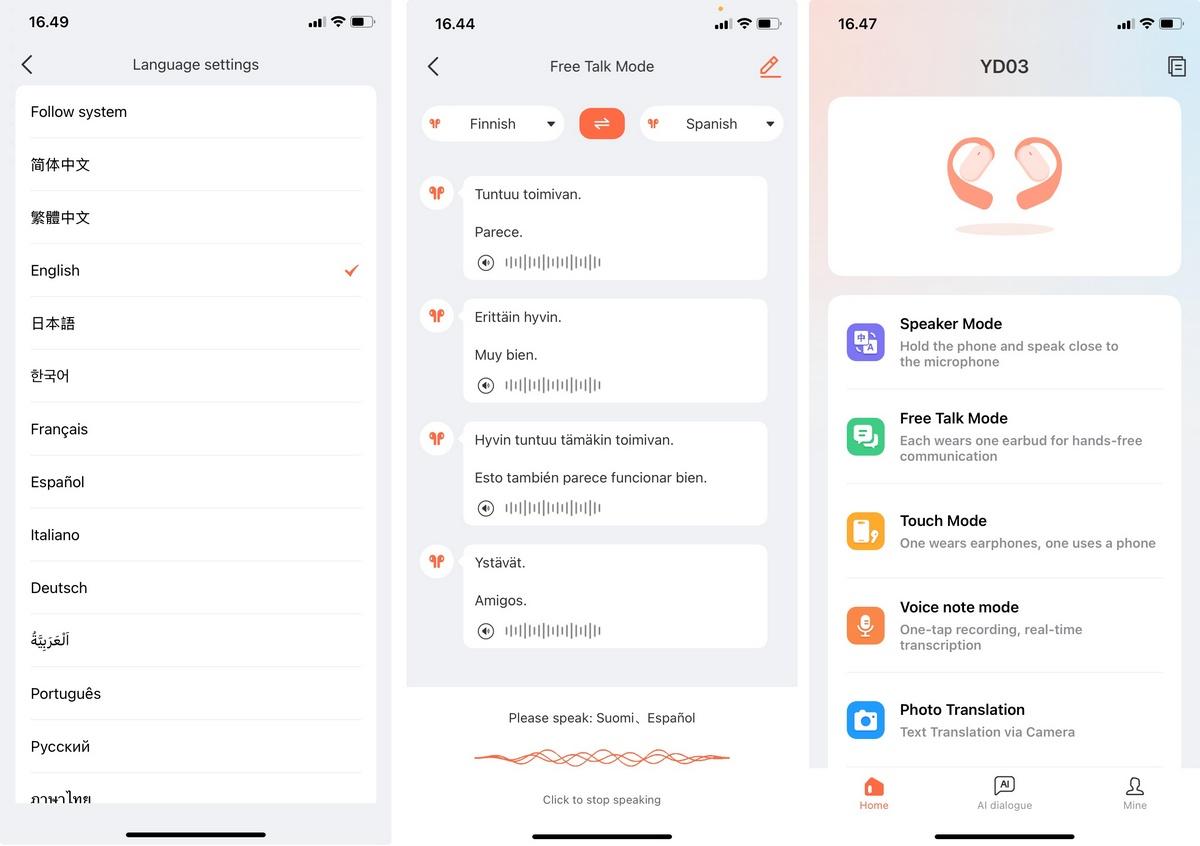
Voice Note -tilassa sovellus muuntaa puheen tekstiksi ja tarvittaessa käännökseksi reaaliaikaisesti. Lisäksi sovelluksessa on erillinen ääni- ja videopuheluille tarkoitettu tila, jossa sovellus kääntää keskustelun reaaliaikaisesti kahden eri kieltä puhuvan osapuolen välillä. Tämä tosin toimi jotenkin oudosti What´s Upin kautta. Lisäksi Photo Translation -toiminto tunnistaa kameralla kuvatun tekstin ja kääntää sen valitulle kielelle.
Kääntäminen toimii yllättävän hyvin. Puheentunnistus reagoi nopeasti ja käännökset olivat ymmärrettäviä ja pääsääntöisesti oikein, jos puhe oli vain ymmärrettävää, Käännöstä kokeiltiin suomi/englanti/ruotsi/saksa -vaihdoilla ja ainakin niillä käännös vaikutti toimivan hyvin, ja miksei myös muilla jopa siis 144 kielellä!
Reaaliaikainen keskustelu sujuu kohtalaisen luontevasti, kun ympäristö ei ole liian meluisa ja puherytmi on rauhallinen. Viiveitä tosin esiintyy satunnaisesti, mutta ne vaikuttavat johtuvan sovelluksen palvelinpuolen kuormituksesta tai verkkoyhteydestä, ei itse sovelluksesta saati ainakaan kuulokkeista. Tasaisella yhteydellä käännös välittyy korvaan useimmissa tapauksissa riittävän nopeasti.
Sovellus on selkeä ja pienen harjoittelun jälkeen kohtalaisen intuitiivinen käyttää. Valitse kielet, aloita käännös ja anna sovelluksen hoitaa loput. Sovellus toimi testissä johdonmukaisesti.
Sovellus muuten toimii periaatteessa millä kuulokkeilla tahansa, eikä kuulokkeita edes välttämättä tarvita. Itse äly on sovelluksessa tai oikeastaan palvelimessa mihin se on yhteydessä. Bluetoothilla puhelimeen olevat kuulokkeet ovat vain tapa käyttää reaaliaikaista puhekäännöstä helposti kahden käyttäjän välillä.
Luokaton ääni
Kuulokkeiden halpa hinta paljastui niiden hyvin onnettomassa äänentoistossa. Ääni on keskialuepainotteinen, basso soi ohuesti, diskantti soi tunkkaisesti. Yksinkertaisesti aika huono ääni. Musiikista kuuntelusta ei YD03:lla voi oikein nauttia. Taajuuskorjaimella ääntä saa paranneltua, mutta mitään omaa taajuuskorjaussovellusta kuulokkeille ei ole tarjolla.
Kaikella on hintansa?
Kaikkinensa YD03-kuulokkeiden laatuvaikutelma on hintaan nähden korkeatasoinen, jopa epäilyttävän korkeatasoinen, ja TransKit-sovellukseen perustuva käännös toimii pääosin sujuvasti. Toisaalta nautittavaan musiikinkuunteluun kuulokkeiden äänenlaatu ei riitä. Kaikkiaan erikoinen tapaus.
Ja miten näitä voidaan myydä näin halvalla? Mieleen nousee helposti tietoturva ja vaikka mitä muutakin, sillä käännös tapahtuu kiinalaisesta pilvipalvelussa ja puhe ja ties mitä muutakin kulkee sovelluksen kautta. Vai pitäisikö vain riisua foliohattu päästä?
Most read today

Latest
Subscribe to the newsletter
Subscribe to our newsletter and stay up to date with the latest news in technology and entertainment electronics.
Survey
Quiz
Nokia phones
Related Posts

Audio-Technica ATH-AL5NC combines an open design and wireless connectivity – battery life up to 75 hours
Audio-Technica expands its range of open headphones with the ATH-AL5NC model, which is the manufacturer's first wireless open headphone. In addition to Bluetooth connectivity, it also features LDAC, noise reduction, and sound leakage...

IFA 2026 – these were the most interesting AV and technology innovations from Berlin
The Berlin IFA 2026 was not built around a single major announcement. TVs with RGB backlighting are making a strong entrance, soundbars are growing into full multi-channel systems, and projectors...
Open-ear headphones are growing from sports to everyday headphones – market share already around 17 percent
The position of open-ear headphones in the headphone market is rapidly strengthening. The joint study by Shokzin and NielsenIQ has examined the use of headphones by more than 5,000 consumers, purchase decisions...
Sonos updates its audio system with three new models – Beam Ultra, Ace Ultra and Sonos 27 expand the lineup
Sonos has unveiled two new audio devices and a next-generation software platform in one go. The new products announced in early September include the compact Beam Ultra soundbar,...
The Gradon Signature family is now complete with four models – the S550 offers both weight savings and a lower price
Grado has expanded its new generation Signature headphone lineup into a four-model collection. The series currently includes the Signature HP100 SE, Signature S950, Signature S750...
Sennheiser MOMENTUM True Wireless 5 saa vaihdettavat akut – kuunteluaikaa luvataan 12 tuntia
Sennheiser uudisti MOMENTUM-nappikuulokkeet viidenteen sukupolveen Sennheiser on julkistanut uudet MOMENTUM True Wireless 5 -nappikuulokkeet. Uutuuden keskeisiä uudistuksia ovat käyttäjän vaihdettavat...
 Suomi
Suomi  English