
In the test: Samsung Galaxy S26 Ultra – a more private display, the familiar overall look

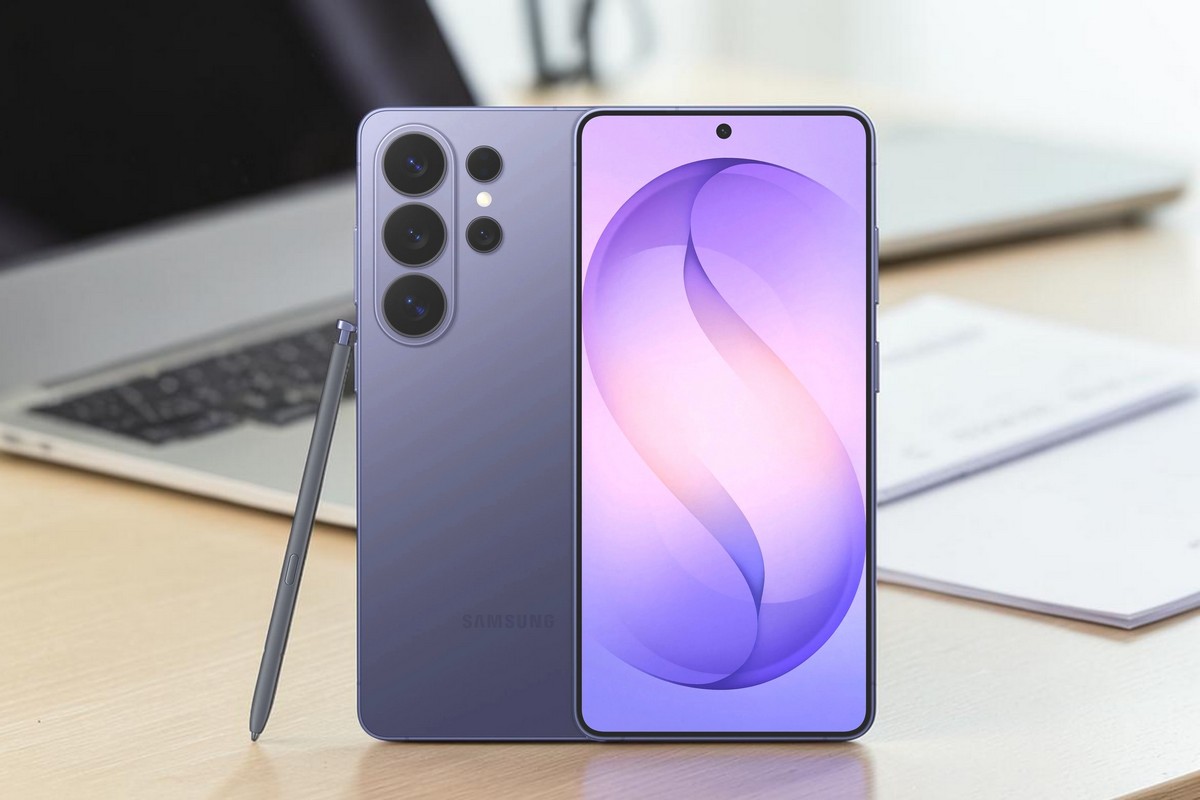
Galaxy S26 Ultra tuntuu tutulta heti paketista avatessa. Kytkimet, liitännät ja käyttölogiikka ovat samoilla paikoilla kuin edeltäjässä, joten käyttöönotto sujuu ilman yllätyksiä. Samsungin siirtymäapu kopioi aiemman Android-puhelimen tiedot kaapelilla tai verkon kautta, ja käyttäjä voi valita erikseen siirrettävät yhteystiedot, asetukset, kuvat ja sovellukset.
Lähempi tarkastelu paljastaa silti useita muutoksia. Runko on vaihtunut titaanista Armour Aluminium -alumiiniin, kulmat ovat aiempaa pyöristetymmät ja kamerayksikkö nousee nyt yhtenäisen korotusosan päällä. Puhelin on myös hieman aiempaa ohuempi. Käteen se istuu suuren kokonsa huomioon ottaen luontevasti, mutta kamerauloke tekee laitteesta pöydällä epävakaan.
Tuttu mutta viimeistelty arkikäytössä
Samsung kuvaa Galaxy S26 -sarjaa tähän mennessä intuitiivisimmaksi Galaxy AI -puhelimekseen. Muutaman kuukauden käytössä S26 Ultra on ennen kaikkea nopea, muokattava ja ennakoitava Android-puhelin. Valikoiden, aloitusnäkymien ja toimintojen räätälöitävyys on laaja, mutta ominaisuuksien määrä tekee asetuksista paikoin raskaat hahmottaa.
Puhelimessa on valmiiksi runsaasti Samsungin omia sovelluksia. Osa täydentää järjestelmän toimintoja, mutta kaikki eivät ole jokaiselle tarpeellisia. Tarpeettomia sovelluksia voi poistaa, mutta ennen poistamista kannattaa tarkistaa, liittyvätkö ne esimerkiksi varmuuskopiointiin, laitteiden väliseen yhteistyöhön tai muihin taustatoimintoihin.
S Pen kuuluu edelleen Ultra-mallin varustukseen. Kynä toimii muistiinpanoissa, kuvien merkinnöissä ja käyttöliittymän tarkassa ohjauksessa, mutta sen rooli jää käyttäjästä riippuen joko keskeiseksi työkaluksi tai harvoin tarvituksi lisäominaisuudeksi.
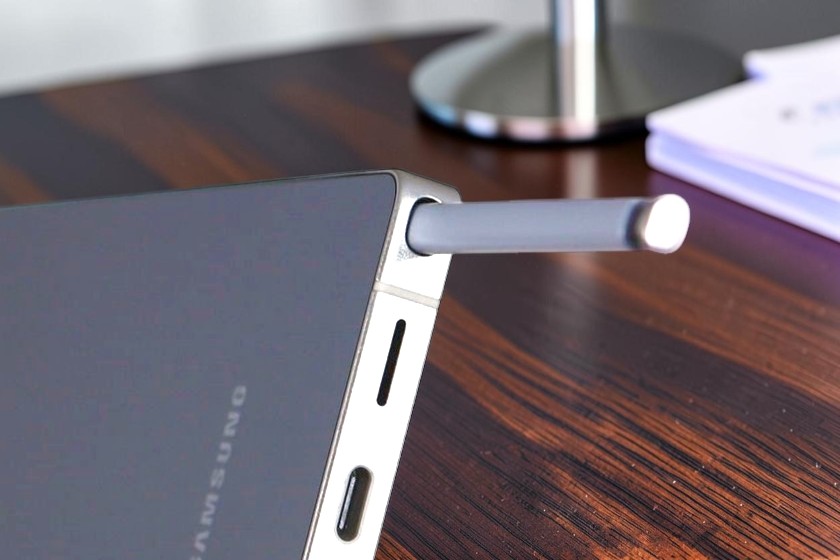
S Pen kuuluu edelleen Galaxy S26 Ultran varustukseen ja liukuu omaan paikkaansa puhelimen rungon sisään. Kynää voi käyttää muun muassa muistiinpanoihin, kuvien merkintöihin ja käyttöliittymän tarkkaan ohjaukseen.
Puhelimessa ei ole muistikorttipaikkaa eikä 3,5 millimetrin kuulokeliitäntää. Tallennustila on siksi valittava ostohetkellä, ja langalliset kuulokkeet liitetään USB-C liitäntään joko suoraan tai erillisellä DAC-adapterilla. Kuvien ja videoiden varmuuskopiointi tapahtuu sisäisestä muistista tietokoneelle tai pilvipalveluun.
Suorituskyky ja lämmönhallinta
Galaxy S26 Ultran suorittimena toimii Snapdragon 8 Elite Gen 5 for Samsung Galaxy. Sovellukset avautuvat nopeasti, moniajo on sujuvaa eikä tavallisessa käytössä ilmennyt suorituskykyä rajoittavia viiveitä. Uudistettu Vapor Chamber -jäähdytys jakaa lämpöä aiempaa laajemmalle puhelimen sisällä. Valmistajan mukaan lämmönhallinnan suorituskyky on parantunut jopa viidenneksen.
Testijakson aikana 5G-yhteys osoittautui joissakin heikon kuuluvuuden paikoissa epävakaammaksi kuin 4G. Havainto riippuu kuitenkin operaattorista, tukiasemasta ja käyttöpaikasta eikä sellaisenaan kerro puhelimen modeemin suorituskyvystä. Hidas tai katkeileva mobiiliverkko vaikuttaa verkkosisältöjen lataamiseen, mutta ei puhelimen paikalliseen laskentatehoon.
Matkakäytössä verkkovierailu ja yhteyden palautuminen lentotilan jälkeen toimivat testissä ongelmitta. Nopeudesta ei kuitenkaan tehty vertailumittausta edeltävään malliin.
Akku kestää päivän, lataus nopeutui
Galaxy S26 Ultrassa on 5 000 milliampeeritunnin akku. Vaihtelevassa arkikäytössä, johon kuului viestintää, verkkoselailua, kuvaamista ja videoiden katselua, akku riitti aamusta iltaan ja jätti tavallisesti 30–60 prosenttia varausta. Kevyellä käytöllä toiminta-aika voi venyä seuraavaan päivään, mutta runsas kuvaaminen, 5G-yhteys, korkea näytön kirkkaus ja QHD+-tarkkuus lisäävät kulutusta.
Valmistajan mukaan erikseen myytävä 60 watin virtalähde lataa akun noin 75 prosenttiin puolessa tunnissa. Testissä pikalataus toimi käytännössä ripeästi, mutta tarkkaa latauskäyrää ei mitattu. Myös langaton lataus ja Wireless PowerShare ovat edelleen käytettävissä.
Akun suojaus -valikossa latauksen ylärajan voi asettaa 80–95 prosenttiin. Toiminto voi vähentää akun jatkuvaa pitämistä täydessä varauksessa. Matkalle tai pitkään päivään lähdettäessä rajoituksen voi poistaa tilapäisesti.
Kun varaustaso laski alle kymmenen prosentin, kuvatessa ja samanaikaisesti AI-hakuja käytettäessä toiminta tuntui hidastuvan. Tavallisessa käytössä akun varaustila ei kuitenkaan aiheuttanut ongelmia.
Privacy Display on näkyvin uudistus
Uusi Privacy Display vähentää näytön näkyvyyttä sivusta katsottaessa. Sen voi kytkeä päälle käsin tai ohjelmoida aktivoitumaan esimerkiksi PIN-koodia, kuviota tai salasanaa syötettäessä. Ilmoitusten saapuessa muun näytön voi himmentää niin, että vain ilmoitusalue jää näkyviin.
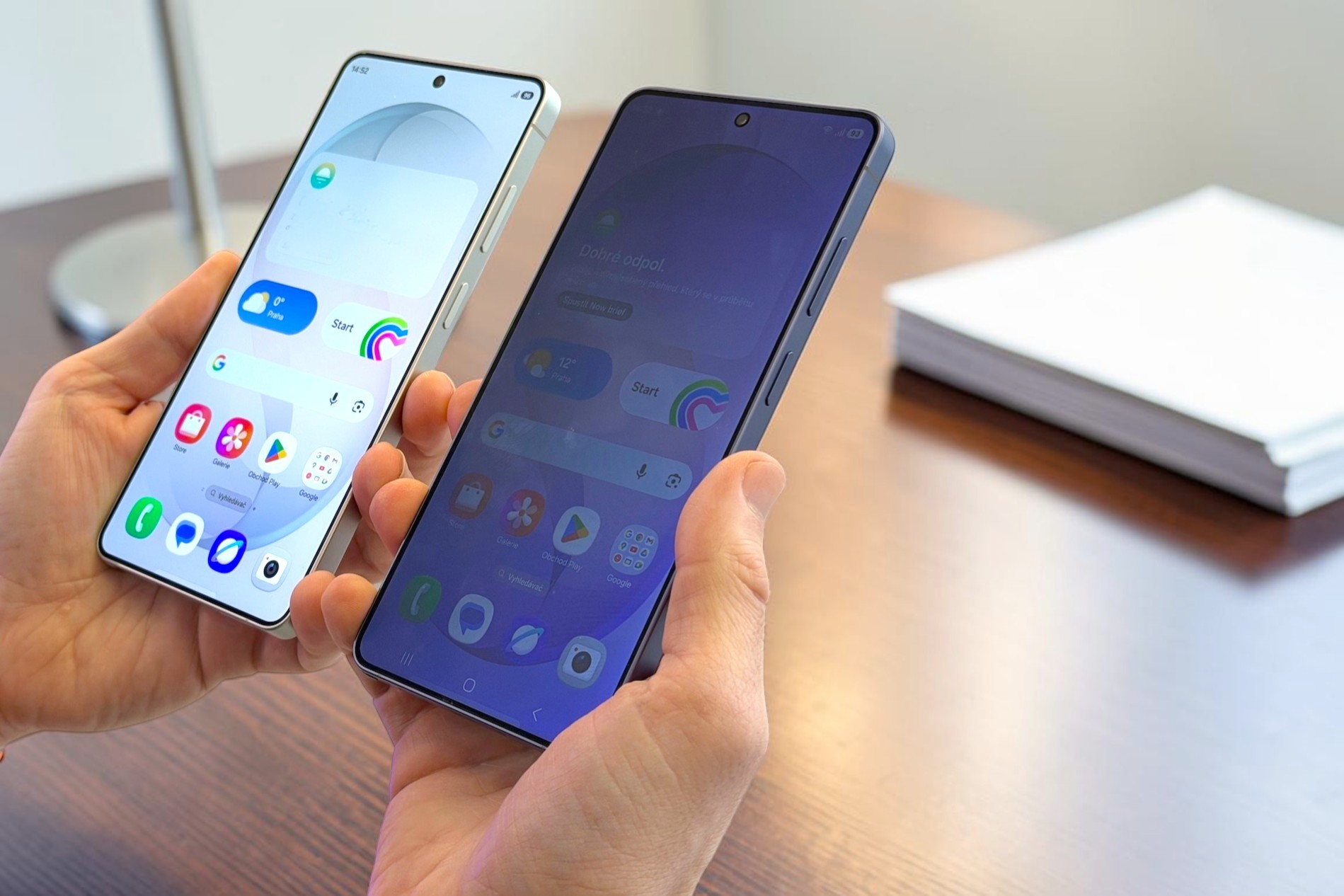
Privacy Display vähentää näytön näkyvyyttä sivusta katsottaessa ja tuo lisäsuojaa esimerkiksi joukkoliikenteessä tai muissa tilanteissa, joissa näytöllä käsitellään yksityisiä tietoja.
Voimakkain suojaustaso estää sivusta kurkkimista tehokkaimmin, mutta samalla näyttö muuttuu harmaammaksi myös suoraan edestä katsottuna. Käytännössä ominaisuus on hyödyllinen joukkoliikenteessä, odotustiloissa ja muissa tilanteissa, joissa näytöllä käsitellään yksityisiä tietoja.
Galaxy S26 Ultran 6,9-tuumaisen Dynamic AMOLED 2X -näytön tarkkuudeksi voi valita HD+-, FHD+- tai QHD+-tason. Suurin tarkkuus on 3 120 × 1 440 pikseliä ja adaptiivinen virkistystaajuus 1–120 hertsiä. Kuva on terävä, kosketusvaste nopea ja vieritys sujuvaa. Suurin tarkkuus kuluttaa akkua enemmän kuin alemmat asetukset.
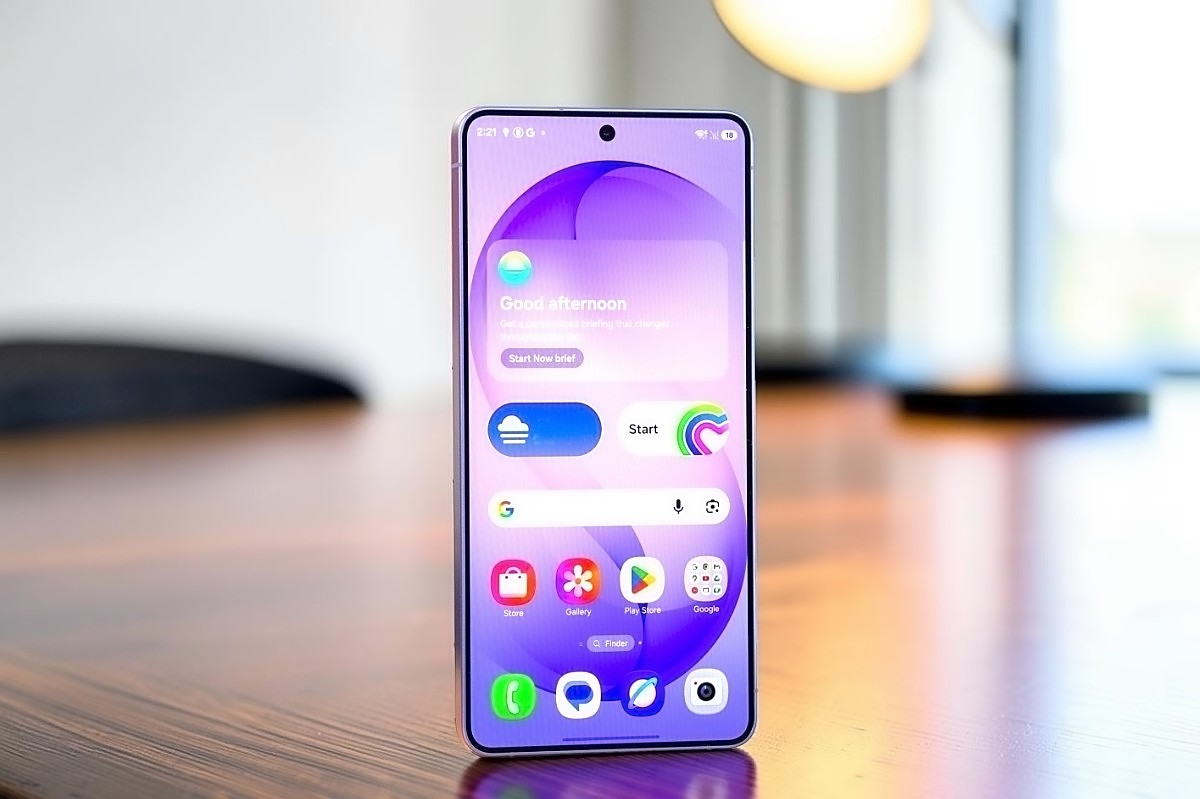
Galaxy S26 Ultran 6,9-tuumainen Dynamic AMOLED 2X -näyttö yltää QHD+-tarkkuuteen ja 120 hertsin adaptiiviseen virkistystaajuuteen. Kuvan terävyys ja kosketusvaste ovat huipputasoa. Etulasi on Corning Gorilla Armor 2 -lasia ja takalasi Gorilla Glass Victus 2 -lasia. Näyttöpinnoite tuntuu liukkaalta ja on kestänyt testikäytössä ilman näkyviä jälkiä. Erillisen suojalasin tarve riippuu silti käyttöolosuhteista ja käyttäjän riskinsietokyvystä.
Galaxy AI toimii - osittain
Sanallinen ohjaus ja tekoälytoiminnot toimivat suomeksi parhaiten yksinkertaisissa hauissa ja selkeästi muotoilluissa pyynnöissä. Monivaiheiset tehtävät eivät aina tuota pyydettyä lopputulosta. Esimerkiksi pyyntö näyttää lähellä olevat ravintolat kartalla tuotti testissä luettelon toimipaikoista mutta ei varsinaista karttanäkymää eikä rajannut tuloksia luotettavasti lähietäisyydelle.
Kameraan yhdistetyt haut ovat käytännöllisempiä. Puhelin voi tunnistaa kuvassa tai kameran näkymässä näkyvää tekstiä, symboleita ja esineitä sekä hakea niistä lisätietoa. Tekstin ja asiakirjojen skannaus oikaisee kuvan perspektiiviä automaattisesti. Kuvien generatiivisella muokkauksella häiritseviä kohteita voi poistaa melko vähällä harjoittelulla, vaikka tulos riippuu taustan rakenteesta.
Kamera jatkaa tutulla perustalla
Kamerajärjestelmä on pääpiirteissään lähellä S25 Ultraa. Kokonaisuus kattaa polttovälit ultralaajakulmasta kahteen telekameraan. Suurempi pääkameran valovoima ja kuvankäsittely tukevat kuvaamista hämärässä, mutta suurin osa parannuksista syntyy laskennallisesti eikä kameran perusrakenne ole muuttunut ratkaisevasti.
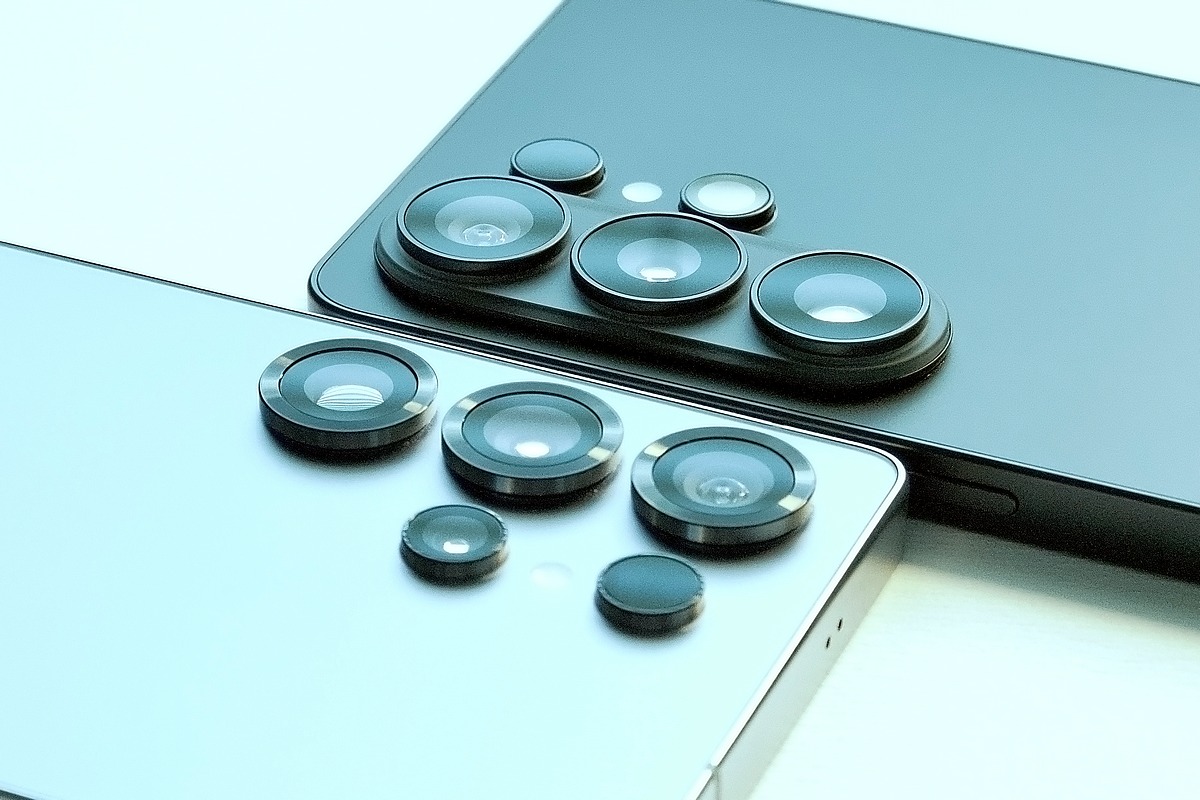
Galaxy S26 Ultran kamerayksikkö (takana) on koottu yhtenäisen korotusosan päälle, kun S25 Ultrassa (edessä) kamerat nousevat erillisemmin takapinnasta. Ulkoasu on muuttunut selvästi, vaikka itse kamerajärjestelmän perusrakenne on edelleen lähellä edeltäjää. S26 Ultrassa kokonaisuus sisältää pääkameran, ultralaajakulmakameran sekä kaksi telekameraa.
Kuvaaminen on nopeaa ja automatiikka tuottaa useimmissa tilanteissa käyttökelpoisen tuloksen. Muotokuvatilassa kohde erottuu taustasta vakuuttavasti, mutta hiusten, lasien ja muiden hankalien reunojen ympärillä voi näkyä laskennallisia virheitä. RAW-kuvaus, Camera Assistant ja muut lisäasetukset antavat automatiikkaa enemmän hallintaa.
Hyvässä valossa kuvat ovat yksityiskohtaisia ja värit näyttäviä. Niukassa valossa ja liikkuvissa kohteissa terävöitys ja kohinanvaimennus voivat muuttua liian voimakkaiksi. Silloin pienet yksityiskohdat pehmenevät ja pinta voi näyttää maalatulta.
Lähikuvauksessa täysautomatiikka ei aina valinnut toimivaa kameraa tai tarkennusetäisyyttä. Parempi tulos edellytti kameran ja kuvaustilan valitsemista käsin. Tämä on syytä huomioida etenkin hyvin lähelle tarkennettaessa.
Most read today
Latest
Subscribe to the newsletter
Subscribe to our newsletter and stay up to date with the latest news in technology and entertainment electronics.
Survey
Quiz
Nokia phones
Related Posts
TESTISSÄ Realme 16 Pro 5G Harry Potter Edition – taikaa vai kallista taikapölyä?
Realme julkaisi rajoitetun erän Harry Potter -teemaista Realme 16 Pro 5G -älypuhelinta. Näyttävä erikoisversio maksaa 699 euroa, noin 300 euroa...
Langalliset kuulokkeet tekevät paluuta – Bosen uusi USB-C-malli tarjoaa vastamelun ilman akkua
Langattomat nappikuulokkeet hallitsevat markkinoita, mutta johto on tekemässä yllättävää paluuta erityisesti nuorempien käyttäjien keskuudessa. Nyt trendiin tarttuu myös Bose, joka...
TESTISSÄ KAIKU WAVE wireless noise cancelling headphones – a Finnish challenger in the tough premium category
Kaiku Wave on 449 euroa maksava langaton vastamelukuuloke, jossa yhdistyyy osittain suomalainen suunnittelu, suomalainen puu, hillitty design, pitkä akunkesto ja...
Philips The Roller and The Tube – Moving sound with its own style
Philips The Roller and The Tube bring back the 1980s boombox spirit without cassettes or radio. It comes with Bluetooth, a battery, Auracast, and...
Harry Potter fan's new phone is here? Only 100 units of the Realme 16 Pro are available in Finland
For Harry Potter fans, there is now a slightly more special smartphone available. Realme has brought the Realme 16 Pro 5G Harry...
IN THE TEST: TCL 65C7L – Bright Mini LED with Wide Color Reproduction
TCL has invested heavily in Mini LED TVs in recent years and has also brought high brightness, rich local contrast, and comprehensive gaming features to clearly...
 Suomi
Suomi  English