
In the experiment: Audio recordings on a phone

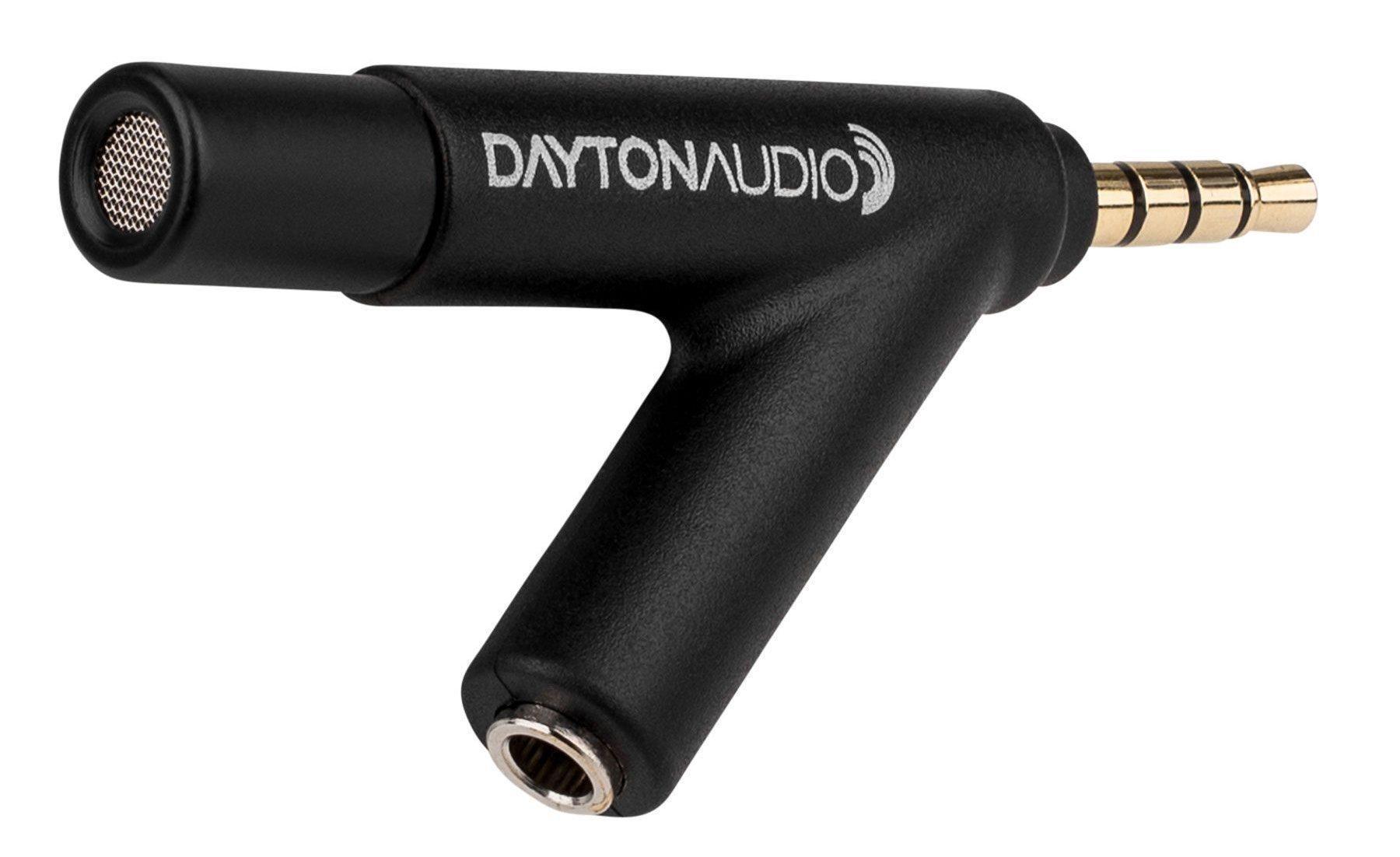
Measurements of the speaker’s playback response and listening room acoustics can be used to infer one from the other. Now it is even possible to measure them with a phone in conjunction with the Dayton Audio IMM-6 microphone.
Text: Teppo Hirvikunnas / Photos: Teppo Hirvikunnas and the device manufacturer
Published in AVPlus magazine 8/2017.
The speaker’s frequency response tells us what frequency range it reproduces and whether the different frequency ranges are balanced with each other. And if not, then what frequencies are problematic? What is the acoustic environment in the listening room like?
The repetition response measurement can help you find a better placement for the speakers: even a small change in the placement and orientation of the speakers can significantly change the sound. The measurement is also useful for adjusting the amplifier’s possible room conditioner or frequency conditioner.
Measuring the echo response is also interesting: at what frequencies do certain instruments operate, how low do the bass frequencies extend, and what do different sound volumes mean in practice?
The measurement does not require expensive investments, computers, or complex arrangements. All you need is the Dayton Audio calibrated microphone priced at 32 euros, a smartphone, and the free measurement app included with it.
But the phone does have its own microphone, right? It’s just not designed for audio measurements, and it lacks the calibration file necessary for measurement use. Calibration tells the measuring device about the deviations caused by the microphone itself in the frequency response, so that they can be compensated for in measurements.
Only the microphone costs money
The Dayton Audio IMM-6 is a small portable measurement microphone that can be attached directly to the smartphone’s 3.5mm headphone jack. The microphone also features an interesting option to listen to the audio picked up by the microphone via a separate 3.5mm headphone output.
In addition, a measurement app is required for the phone or tablet device. For Android, the free AudioTool is recommended, and for iOS, the 20 dollar Audio Tools app (not the same programs; note the slight difference in the writing style). For Apple's program, you can also purchase a wide variety of additional accessories ranging from 400 dollars up.
The price difference between the apps already shows that the iOS app is more professional than Android, but only by a small margin, so Android is, first and foremost, free, so this time we’re only focusing on that.
AudioTools software
The AudioTools application is versatile, including measurements of the 1/1-, 1/3-, and 1/16-octave response, loudness measurements, impulse response measurements, spectrogram, water splash measurement, polarity verification, a versatile signal generator, and much more.
More information about the AudioTool app can be found in the detailed online user guide at sites.google.com/site/bofinit/audiotool.
Installing the app from Google Play is easy, but importing the microphone calibration file into the app is not. It has to be downloaded from Dayton's website. This is only possible on a computer. For some reason, the site doesn't allow you to download the file directly to your mobile device.
The file has a .txt extension, and for AudioTool it should be named .cal. This is easier said than done on Windows 10, where the default is to hide file extensions. Therefore, this must first be enabled in the resource management display settings.
The renamed file is transferred to the phone in the AudioTools program's directory.
This can be done, for example, by sending the file as an attachment in an email, from which it can be downloaded to the phone.
This process is not difficult in itself, but it does require some experience in renaming and transferring files to the phone. One option is to manually enter the calibration data into the application.
Good measurement results
To make measurements, the microphone is connected to the phone and the app is launched. The AudioTool interface isn’t the most beautiful, but it’s clear and reasonably easy to use.
The accuracy of the microphone and measurement app was astonishingly good. We compared the measurement made with the professional Dayton Audio OmniMic V2 measurement system in a normal room with the measurement made with the Dayton Audio IMM-6 microphone and the AudioTool app.
OmniMic naturally provides a more accurate and, above all, more distinct measurement result, but the difference compared to the iMM-6/AudioTool combination was surprisingly small, considering the intended use.

Most read today
Latest
Subscribe to the newsletter
Subscribe to our newsletter and stay up to date with the latest news in technology and entertainment electronics.
Survey
Quiz
Nokia phones
Related Posts
TESTISSÄ KAIKU WAVE wireless noise cancelling headphones – a Finnish challenger in the tough premium category
The Kaiku Wave is a wireless noise-canceling headset costing 449 euros, combining partly Finnish design, Finnish wood, restrained design, long battery life and...
Philips The Roller and The Tube – Moving sound with its own style
Philips The Roller and The Tube bring back the 1980s boombox spirit without cassettes or radio. It comes with Bluetooth, a battery, Auracast, and...
Cayin Jazz 70 – genuine tube sound and style at a reasonable price
The tube amplifier doesn't need to cost several thousand euros. The new Jazz 70 from Cayin brings classic EL34 tube technology, visible tubes, analog meters, and hand-crafted controls...

The use of artificial intelligence in music is growing rapidly, but there is still a lot to be learned about its use – at least in Finland.
Artificial music evokes significantly more reservations in Finns than the use of artificial intelligence in general. Artificial intelligence is rapidly becoming a part of everyday life, but the output it produces...
The new arrival of CDs is also reflected in devices – the Argon Audio CD1 is a new CD player priced at 399 euros
The arrival of vinyl records has been ongoing for a long time, and now a similar trend is also evident in CD records. Argon Audio responds to this interest with the new CD1 player,...
Audio-Technica ATH-AL5NC combines an open design and wireless connectivity – battery life up to 75 hours
Audio-Technica expands its range of open headphones with the ATH-AL5NC model, which is the manufacturer's first wireless open headphone. In addition to Bluetooth connectivity, it also features LDAC, noise reduction, and sound leakage...
 Suomi
Suomi  English