
JBL Tour One M3 Smart Tx – A new strong contender in better-class noise-cancelling headphones

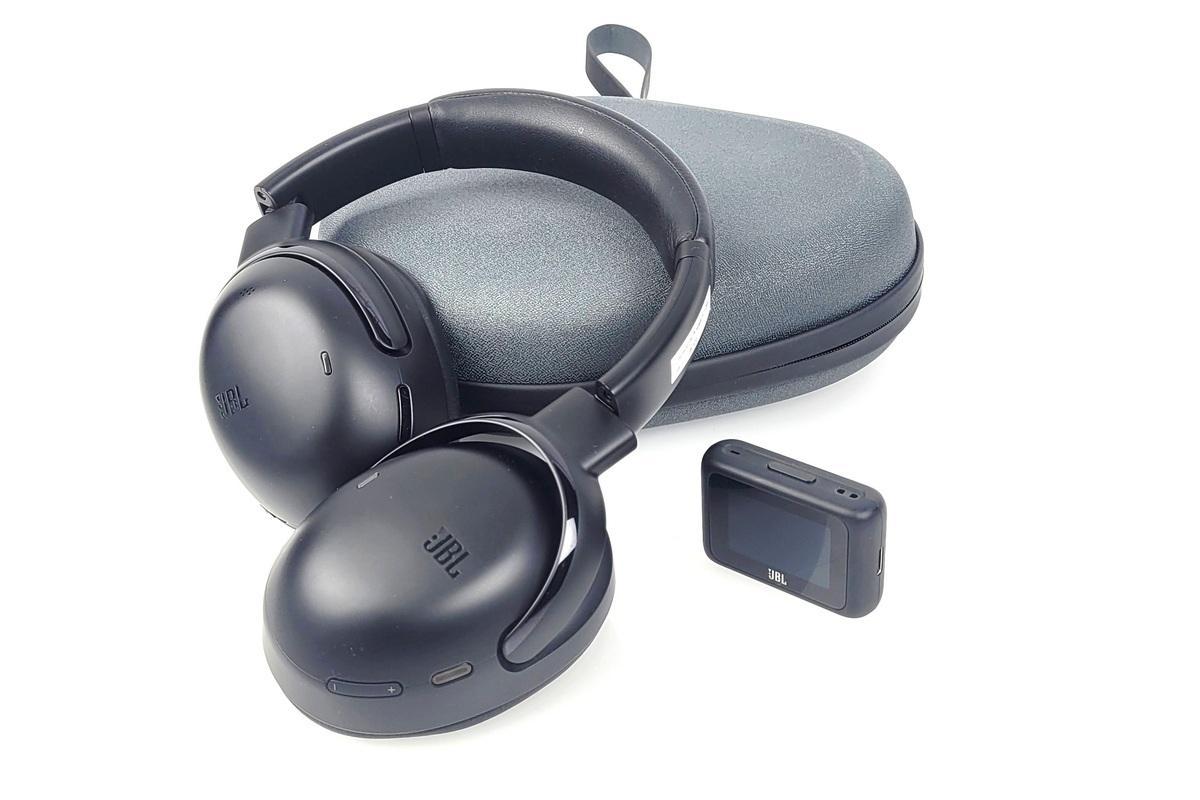
JBL on tilastojen mukaan ollut jo vuosia markkinajohtaja kuulokkeissa. Menestystä on tullut erityisesti edullisten ja keskihintaisten kuulokkeiden sarjassa. Kun siirrytään 300 - 500 euron hintaisten “premium”-sankakuulokkeiden luokkaan, ovat palkintopallilla perinteisesti loistaneet muut merkit kuten Bose ja erityisesti Sony. Nyt uusi kolmannen sukupolven JBL Tour One -sarja on nyt tullut vakavasti haastamaan nämä konkarivalmistajat.
Tour One M3 on tyypillinen ylemmän hintaluokan langaton kuuloke: Kyseessä siis 399 euroa maksavat (jutun kirjoitushetkellä) sankarakenteiset, langattomat vastamelu over-ear kuulokkeet. Kuulokkeet ovat muovirakenteisena kevyet, mutta samalla hieman “halvan” oloiset, vaikka sinänsä viimeistelyssä ja laatutuntumassa ei ole mitään vikaa ja rakenne on tukeva. Laadukkuudesta kertoo se, ettei kuuntelun aikana kuulu mitään ylimääräisiä mekaanisia tai natisevia ääniä. Nivelet ovat tosin muovia, joten aika näyttää, miten ne kestävät pidemmässä käytössä. Sellainen tietty premium-fiilis hieman kuitenkin puuttuu. Kullanvärisenä (mitä JBL kutsuu nimellä “mokka”) ehkä hieman enemmän.
Korvatyynyjen pehmusteet ovat keinonahkaa ja kevyitä kuulokkeita on todella mukava pitää päässä. Kuulokkeet taittuvat myös kasaan ja mukana seuraa kuljetuskotelo.
Valmistaja lupaa jopa 70 tunnin käyttöajan ilman vastamelutoimintoa ja 40 tuntia sen kanssa – molemmat ovat luokkansa huippua. Ja testeissä on päästy jopa yli 50 tunnin käyttöaikoihin. Ja jo viiden minuutin pikalatauksella luvataan 5 tuntia lisää kuunteluaikaa.


Äpillä ääni kuntoon
Kuulokkeet yhdistyvät puhelimeen vaivattomasti Bluetoothilla ja ovat sinänsä heti valmiina käyttöön ja kuunteluun, mutta käytännössä kuulokkeista saa kaikki irti vain puhelimeen ladattavalla JBL Headphones -sovelluksella. Näin on itse asiassa monen muunkin kuulokkeen kohdalla.
Sovelluksessa on runsaasti erilaisia asetuksia ja säätöjä, ja niihin kannattaakin tutustua ajan kanssa. Äänen kannalta tärkeimpänä säätönä on 10-alueinen taajuuskorjain, jolla ääntä voi muokata monipuolisesti. Ja se kannattaa.
Flat-asetuksella eli ei korjausta ääni on sinänsä ihan ok ja miellyttävä, mutta bassoa hieman runsaanlaisesti (makuasia toki) ja yleissävy hieman tummahko. Taajuuskorjaimessa on kuusi erilaista esiasetusta, joista Studio tarjoaa tasapainoisimman äänen. Mutta miksei tarjolla ole ehdottomasti parhaimman tuloksen antavaa niin sanottua Harman Target Curve -asetusta? Siis sellaista, jonka toistotulos olisi tutkimuksissa toistuvasti arvioitu neutraaliksi ja yleisesti miellyttäväksi mahdollisimman monelle kuuntelijalle? Syy on luultavasti kaupallinen ja käytännöllinen: valmistajat haluavat erottua toisistaan ääniprofiileillaan ja samalla tarjota valmiita ja “helppoja” esiasetuksia, jotka sopivat esimerkiksi basson ystäville. Monet käyttäjät kokevat korostetun basson ja diskantin aluksi vaikuttavampana – vaikka se pitkällä aikavälillä alkaa yleensä kuulostaa rasittavalta.
Erikoista ettei valmistaja tarjoa edes valinnaisena "Reference" tai "Harman Target" -esiasetusta. Varsinkin kun “Harman Curvessa” kyse on nimenomaan JBL:n omistavan Harman Companyn oman tutkimuksen tuotoksesta.
Lisätietoa Harman-target-vasteesta AVPlussan artikkelissa: EQ:lla 20 € kuulokkeista 200 € soundit?
Toiston saa lähemmäksi optimaalista vastetta seuraavilla taajuuskorjaimen asetuksilla:
Keski- ja korkeita taajuuksia korostetaan 2000 Hz:n kohdalla +2-3 dB ja 4000 Hz:n kohdalla +4-6, ehkä pieni -1-2 dB vaimennus 8000 hertsissä. Matalat taajuuden voi jättää sillensä tai vaimentaa 32 ja 64 hertsiä pari desibeliä ja 259 hertsiin vastaavasti pari desibeliä lisää. Oman maun mukaan. Ja tietenkin bassoa saa korostaakin, jos siltä tuntuu.
Pienen hienosäädön jälkeen voi soundia kuvailla musikaaliseksi ja se asettuu oman hintaluokkansa kärkeen tai ainakin lähelle sitä.

Sovelluksen lukuisia muita toimintoja ovat muun muassa ympäristön äänten säätö (Ambient Aware), puhetila, kosketuskontrollien poiskytkentä sekä Personi-Fi-kuulotesti, joka JBL:n mukaan optimoi taajuuskorjauksen kuulosi mukaan – käytännössä tällä ei kuitenkaan havaittu olevan juuri vaikutusta, eikä muualtakaan löydy vahvoja todisteita merkittävästä parannuksesta. Lisäksi sovelluksella voi hallita Spatial 360 -tilaa, joka tuo ääneen tilantuntua pään liikkeiden seurannalla, mutta vaikutus on varsin hienovarainen eikä kaikkien mielestä tuo kuunteluun oleellista lisäarvoa.
JBL Headphones -sovelluksessa ei ole myöskään erillistä widget-toimintoa, jolla esimerkiksi vastamelun tai taajuuskorjaimen säädön voisi tehdä suoraan puhelimen kotinäytöltä.

Smart Tx -ohjain / lähetin
Kuulokkeiden varustukseen kuuluu erillinen tulitikkuaskin kokoinen ja pienellä kosketusnäytöllä varustettu JBL Smart Tx-laatikko, joka toimii sekä kuulokkeiden toimintojen ohjaimena että langattomana äänilähettimenä. Se voidaan liittää USB-C- tai 3,5 mm-liitännällä mihin tahansa äänilähteeseen, kuten televisioon, tietokoneeseen tai lentokoneen viihdejärjestelmään, ja se välittää äänen edelleen kuulokkeisiin JBL:n oman vähäviiveisen langattoman yhteyden kautta. Kosketusnäytöltä voi säätää musiikkia, vastamelua ja taajuuskorjausta sekä vastata puheluihin ilman puhelinta. Lisäksi lähetin tukee uutta Auracast-tekniikkaa, joka mahdollistaa äänen jakamisen useisiin yhteensopiviin kuulokkeisiin tai kaiuttimiin yhtä aikaa.


USB-C:llä ääni oli hyvä, mutta jostain syystä analogisen 3,5 mm-liitännän kautta syötettynä äänenlaatu jäi selvästi odotettua heikommaksi. Suorastaan huonoksi. Näin ollen niin TV- kuin lentokonekäyttöön sitä ei voi suositella. Varsinkin kun kuulokkeet voidaan kytkeä suoraan USB-C-lähtöön ja mukana tulee vielä USC-C/3,5 mm kaapelikin. Tosin hieman ehkä turhan lyhyet ja jäykät sellaiset.
Kaiken kaikkiaan Smart Tx vaikuttaa muutenkin hieman turhalta ominaisuudelta. Kuulokkeet voi onneksi ostaa myös ilman sitä 50 euroa halvemmalla.
Most read today

Latest
Subscribe to the newsletter
Subscribe to our newsletter and stay up to date with the latest news in technology and entertainment electronics.
Survey
Quiz
Nokia phones
Related Posts
Philips The Roller ja The Tube – Liikkuvaa ääntä ihan omalla tyyliillä
Philips The Roller ja The Tube tuovat 1980-luvun boombox-hengen takaisin ilman kasetteja tai radiota. Tilalla ovat Bluetooth, akku, Auracast ja...
Cayin Jazz 70 – genuine tube sound and style at a reasonable price
The tube amplifier doesn't need to cost several thousand euros. The new Jazz 70 from Cayin brings classic EL34 tube technology, visible tubes, analog meters, and hand-crafted controls...

The use of artificial intelligence in music is growing rapidly, but there is still a lot to be learned about its use – at least in Finland.
Artificial music evokes significantly more reservations in Finns than the use of artificial intelligence in general. Artificial intelligence is rapidly becoming a part of everyday life, but the output it produces...
The new arrival of CDs is also reflected in devices – the Argon Audio CD1 is a new CD player priced at 399 euros
The arrival of vinyl records has been ongoing for a long time, and now a similar trend is also evident in CD records. Argon Audio responds to this interest with the new CD1 player,...
Audio-Technica ATH-AL5NC combines an open design and wireless connectivity – battery life up to 75 hours
Audio-Technica expands its range of open headphones with the ATH-AL5NC model, which is the manufacturer's first wireless open headphone. In addition to Bluetooth connectivity, it also features LDAC, noise reduction, and sound leakage...
The Marantz MCR 60n combines CD, vinyl, streaming, and TV audio into one device
Marantz has introduced the new MCR 60 multi-functional device, which continues the manufacturer's long series of compact Melody systems. A web player, CD player, and...
 Suomi
Suomi  English