
Dayton Audio DSP-LF: A Magic Box for Active Subwoofers

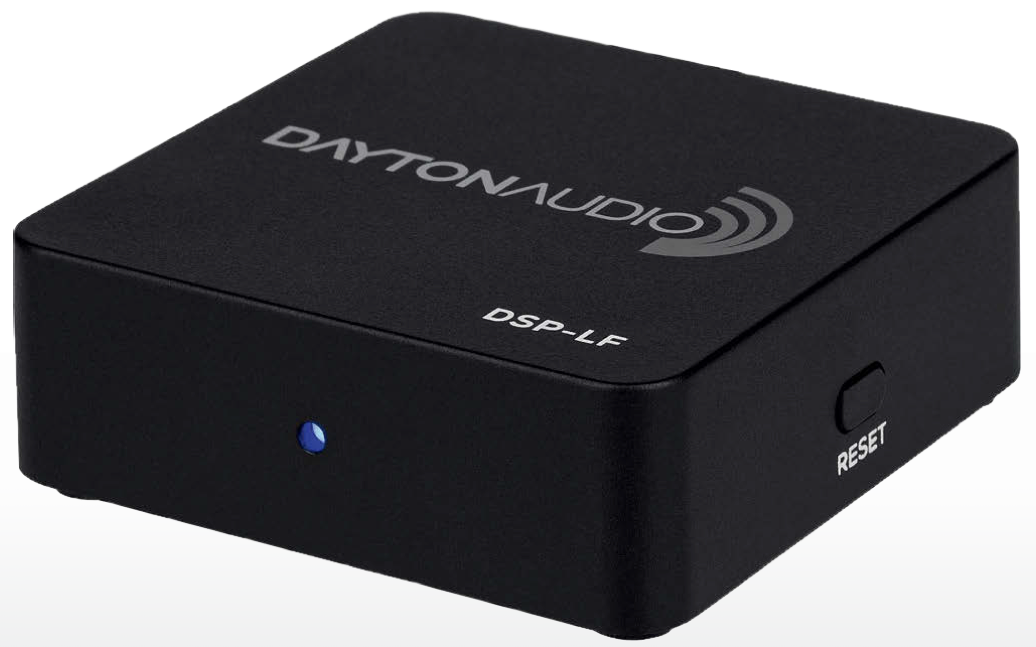
The Dayton Audio DSP-LF is a small but versatile accessory for fine-tuning subwoofer playback. For less than 100 euros, it offers, among other things, advanced room correction for iOS devices and any active subwoofer.
Text & Photos: Heikki Kivelä & Teppo Hirvikunnas
These days, even some of the more affordable integrated amplifiers may include some kind of room correction option, which is particularly useful when configuring a multi-channel system. Conversely, more advanced room correction tools provide users with quite versatile tools for customizing sound reproduction, but they do, of course, come at a price. We explored this topic in greater depth in AVPlus issue 5/21, among other places.
The principle behind various room correction methods is largely the same: using some type of microphone, the output from one or more speakers is measured using software installed on a computer or smart device, which in turn compensates for various room-induced playback distortions using advanced digital signal processing. Such a DSP system is capable of adjusting bass response, for example, with significantly greater precision than traditional tone controls.
Why is this done? Well, for example, in cases where—perhaps for interior design reasons—the speakers cannot be optimally positioned relative to the listening position. In addition, many more advanced enthusiasts may use room correction as a starting point for making their own, more precise adjustments, since they tend to notice different room modes—especially in the bass range—quite quickly.
If your amplifier doesn't have a room correction feature, you can add one to your package as an accessory. One example of this is the Dayton Audio DSP-LF, which is designed solely for customizing the sound of an active subwoofer.
A Swiss pocket knife for less than 100
When paired with the iWoofer app, which can be downloaded to a smart device, the small DSP-LF is quite an advanced device for its size. Featuring simple 3.5-millimeter connectors, the box is easy to place almost anywhere, as it’s controlled via Bluetooth using the companion app. The basic version of the control app is free and available for Android and iOS devices. However, only iOS users can access the room calibration feature for a one-time fee of 4.99 euros. The reason for this is most likely that the specifications for iOS device microphones are more precisely defined and therefore more suitable for this type of task than the hundreds of different Android phone microphones.
But as mentioned, Android users can also access many of DSP-LF’s basic features, such as adjusting the crossover frequency and gain, configuring various filters and equalizer profiles, modifying playback delay and phase, adding synthetic subharmonics to the playback, and so on. In principle, the iWoofer app is relatively straightforward to a professional’s eye, but overall, the app does feel a bit rough around the edges. There are bugs as well as translation and typos, but they don’t significantly interfere with basic use. Furthermore, the DSP-LF is the kind of device that, once you take the time to fine-tune it, you probably won’t need to go back to the settings again.
One of the most powerful tools in the iWoofer (Pro) app, designed to control the DSP-LF, is a versatile equalizer that allows a skilled user to correct many playback issues. Automatic room calibration calculates the compensation response based on measurements taken near the subwoofer and at the listening position. It is recommended that measurements be taken multiple times to ensure the best results.
The home screen of the control app isn't exactly a triumph of design, but all the essentials are easy to find and the app works.
It works, but it takes some skill
DSP-LF and iWoofer (including the Pro version) are, in their own way, quite decent tools, but to get the most out of them, you need to know a thing or two about sound reproduction and know how to use your own system. In practice, the first step is to have some understanding of the settings for your amplifier and main speakers, since, for example, the crossover frequency between the subwoofer and the front channels is often adjusted programmatically in the AV receiver.
First, you need to know what settings are configured on the amplifier, since the signal from the amplifier goes to the DSP-LF in only one direction. In practice, the device and the app do not take the main channels’ playback into account at all, so you need to be able to set some kind of high-pass filter for them. On the other hand, as mentioned, there are plenty of tools available for adjusting the subwoofer.
However, automatic room correction, for example, may not necessarily yield groundbreaking results at the system level due to its limited scope. Although the iWoofer Pro takes measurements both near the subwoofer and at the listening position, thereby revealing the most significant room modes, we didn’t actually find the app’s compensated response curve for the subwoofer to be particularly groundbreaking on its own. And even though the actual measurement process went smoothly through its various stages, the app still froze while fine-tuning the compensation settings, requiring a restart (device: iPhone 13 mini, iOS version 15.5).

The package includes two RCA-to-3.5 mm connection cables, a USB power cable, and a compatible EU power adapter. Unfortunately, the USB port on the built-in amplifier, for example, does not provide enough power for the device.
In practice, the most useful tool in the package—in skilled hands—is, for example, a versatile parametric equalizer that allows for as many as 25 adjustment bands with Q-value and level controls. In addition, more specific adjustments—such as stepless phase inversion—may be necessary, for example, when working with a subwoofer that has limited capabilities.
Most read today
Latest
Subscribe to the newsletter
Subscribe to our newsletter and stay up to date with the latest news in technology and entertainment electronics.
Survey
Quiz
Nokia phones
Related Posts
Philips The Roller ja The Tube – Liikkuvaa ääntä ihan omalla tyyliillä
Philips The Roller ja The Tube tuovat 1980-luvun boombox-hengen takaisin ilman kasetteja tai radiota. Tilalla ovat Bluetooth, akku, Auracast ja...
Cayin Jazz 70 – genuine tube sound and style at a reasonable price
The tube amplifier doesn't need to cost several thousand euros. The new Jazz 70 from Cayin brings classic EL34 tube technology, visible tubes, analog meters, and hand-crafted controls...

The use of artificial intelligence in music is growing rapidly, but there is still a lot to be learned about its use – at least in Finland.
Artificial music evokes significantly more reservations in Finns than the use of artificial intelligence in general. Artificial intelligence is rapidly becoming a part of everyday life, but the output it produces...
The new arrival of CDs is also reflected in devices – the Argon Audio CD1 is a new CD player priced at 399 euros
The arrival of vinyl records has been ongoing for a long time, and now a similar trend is also evident in CD records. Argon Audio responds to this interest with the new CD1 player,...
Audio-Technica ATH-AL5NC combines an open design and wireless connectivity – battery life up to 75 hours
Audio-Technica expands its range of open headphones with the ATH-AL5NC model, which is the manufacturer's first wireless open headphone. In addition to Bluetooth connectivity, it also features LDAC, noise reduction, and sound leakage...
The Marantz MCR 60n combines CD, vinyl, streaming, and TV audio into one device
Marantz has introduced the new MCR 60 multi-functional device, which continues the manufacturer's long series of compact Melody systems. A web player, CD player, and...
 Suomi
Suomi  English